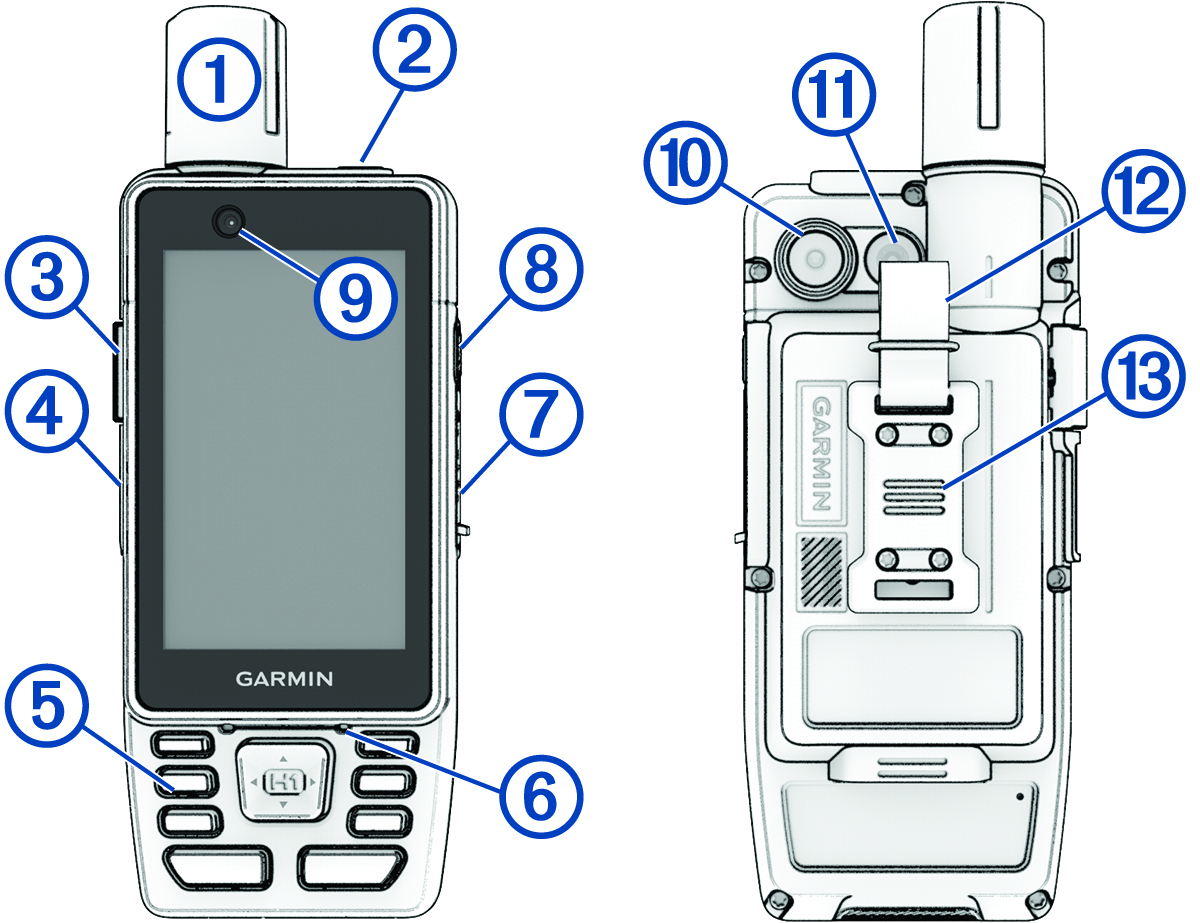
GPSMAP H1i Plus Device Overview
|
|
Internal Iridium® and GNSS antenna |
|---|---|
|
|
Press to enter sleep mode or wake the device. Hold to view the notification center and controls, and turn the device on or off (Notification Center and Controls). |
|
|
SOS button under protective cover (Initiating an SOS Rescue). |
|
|
USB port under weather cap (Charging the GPSMAP Device). |
|
|
Buttons (Buttons). |
|
|
Microphone (Recording a Voice Note, Using Voice Commands) |
|
|
microSD® card slot under weather cap (Installing a Memory Card). |
|
|
Action button NOTE:
You can customize the shortcut function for this button during the initial setup, or from
the device settings menu
(Customizing the Action Button).
|
|
|
Front-facing camera (Camera and Photos) |
|
|
Rear-facing camera (Camera and Photos) |
|
|
Flashlight (Using the Flashlight) |
|
|
Carabiner loop |
|
|
Spine mount NOTE:
Go to garmin.com to purchase spine
mount 2 optional accessories.
|
