Varia App
The device can improve situational awareness. It is not a replacement for cyclist attentiveness and good judgement. Always maintain awareness of your surroundings, and operate the bicycle in a safe manner. Failure to do so could result in property damage, serious injury, or death.
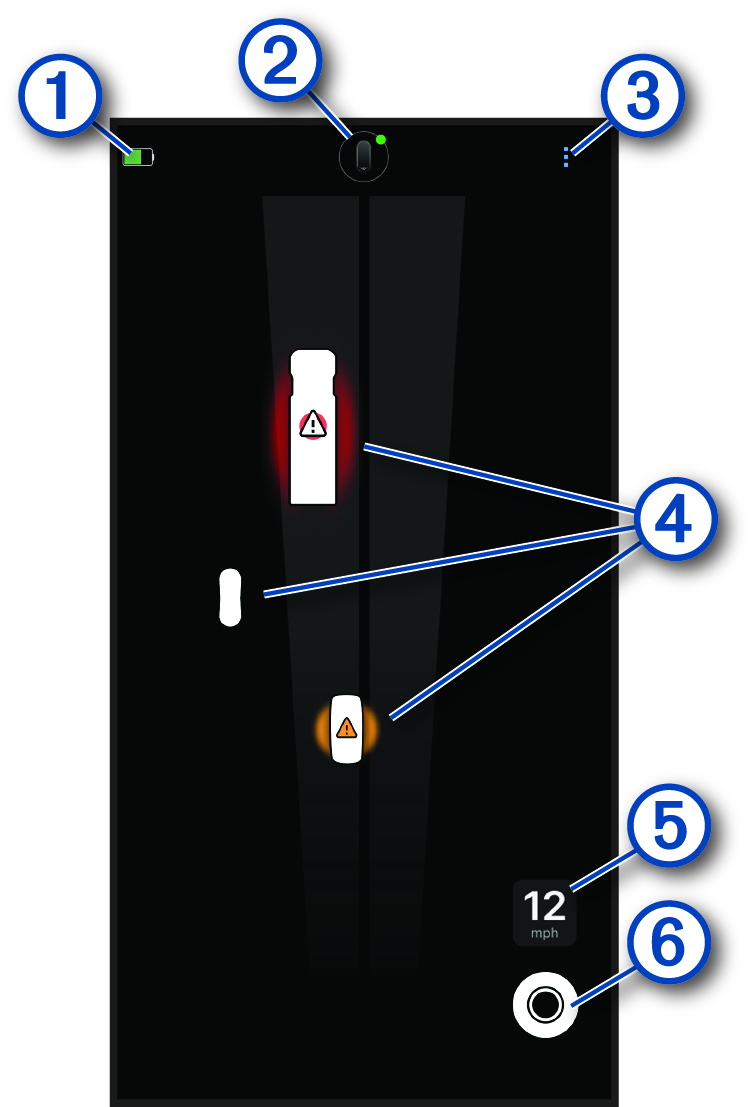
When connected to the Varia™ RearVue 820 radar tail light, the Varia app home screen shows a graphical representation of the road behind you, as you ride.
|
|
Radar tail light battery level |
|---|---|
|
|
Radar tail light settings |
|
|
Varia app settings (Varia App Settings) |
|
|
Vehicles |
|
|
Bike speed |
|
|
Select to change light modes (Light Modes). |
|
|
Mid-level threat |
|
|
High-level threat |


Vehicle icons reflect the estimated size of the vehicle, as detected by the radar, and move up and across the screen as they approach you. The radar continually reassesses and updates the icon to reflect the vehicle's approximate size. When the vehicle size can't be estimated, vehicles are shown as an indistinct shape.
The radar calculates the threat level based on vehicle size, speed, and lateral distance from your path.
The app emits audible tones when a threat is detected and when all threats are cleared (Customizing the Varia App Sounds and Alerts Settings ).