Checking and Cleaning the Power Terminals

WARNING

Always disconnect the motor from the battery before handling or working with the propeller, propeller drive motor, electrical connections, or electronics enclosures to avoid serious injury or death.

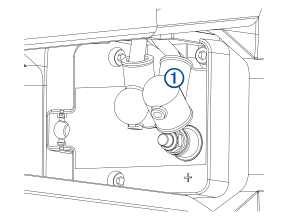
  1. With the motor in the deployed position, pull the rubber shields away from the positive and negative power terminals Callout number 1.

    Power cable location with callout
  2. Verify the terminal nuts are snug and that the ring terminals cannot move.
  3. If necessary, use a torque wrench and a 10 mm socket to make sure the nuts are tightened to 4 N-m (36 lbf-in).
  4. If necessary, clean any corrosion from the terminals using a wire brush.
    NOTE: In cases of heavy corrosion, you may need to remove the power cables for an effective cleaning. See the Force® Trolling Motor Field Service Manual on garmin.com/manuals/force_trolling_motor for detailed instructions on disconnecting and removing the power cables from the motor.
  5. Cover the connections with dielectric grease.
  6. Securely place the rubber shields back over the power terminals.
GUID-16D2E284-7D08-461D-80CE-7D490C67A3EB v7
April 2025