Device Overview
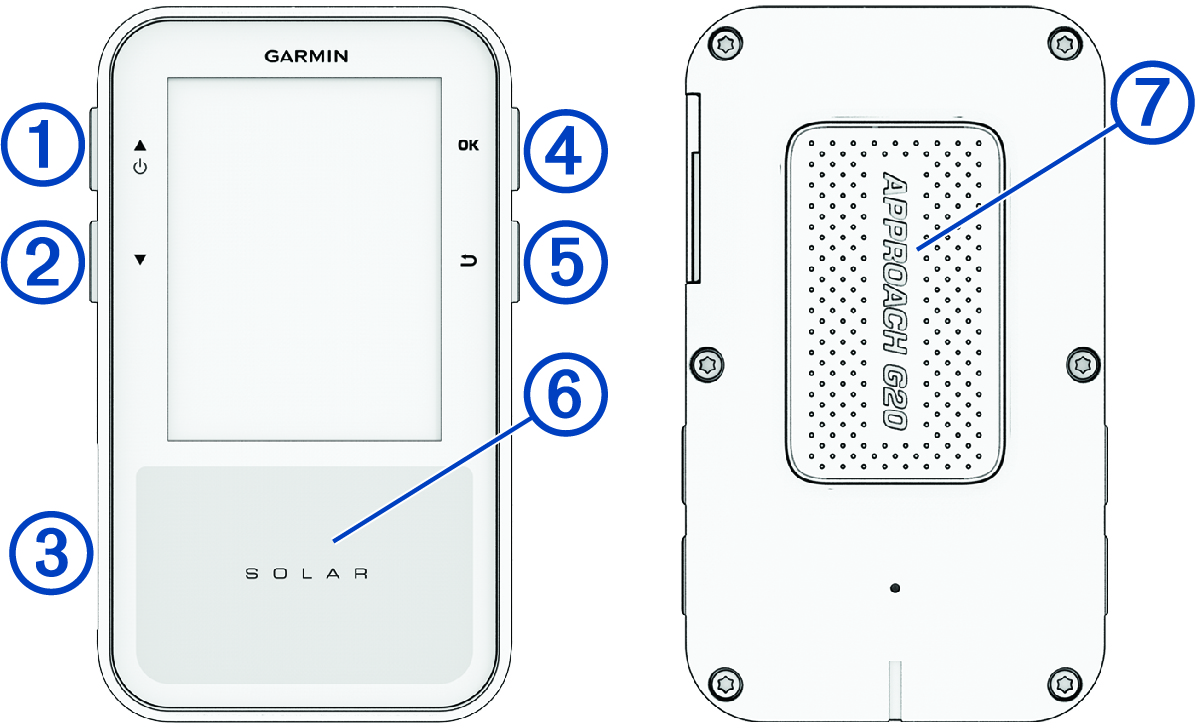
-


-
Hold to turn the device on and off.
Hold to open the power menu (Power Menu).
Press to scroll through menus, options, and settings.
During play, press to scroll through hazards, layups, doglegs, and more.
-

-
Press to scroll through menus, options, and settings.
During play, press to scroll through hazards, layups, doglegs, and more.
- USB port (under weather cap)
-
Lift the weather cap to charge the device or connect it to a computer (Charging the Device).
Replace the weather cap to prevent damage to the USB port (Cleaning the USB Port).
- OK
-
Press to start a round of golf (Playing Golf).
Press to choose an option or open the menu for a page.
During play, press to access in-round features.
-

-
Press to return to the previous screen.
- Solar charging
-
Point the device toward sunlight to extend the battery life (Solar Charging).
- Magnet
-
Place the back of the device onto the magnetic clip or a metal surface on a golf cart (Using the Clip).