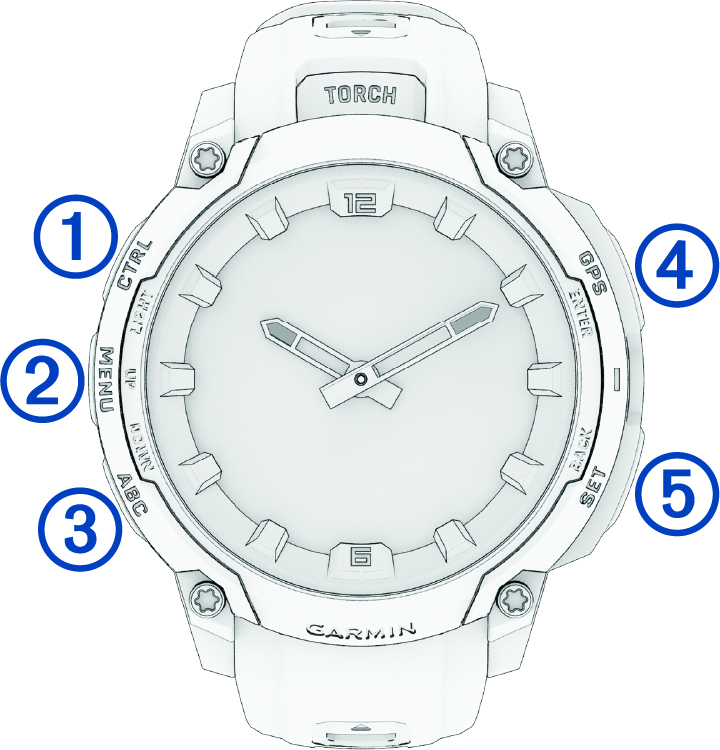
|
LIGHT
CTRL
|
-
Press to turn on the device.
-
Press to illuminate the screen.
-
Quickly press twice to turn on or off the flashlight
(Using the Torch).
-
Hold for two seconds view the controls menu (Controls).
-
Hold for five seconds to request assistance (Requesting Assistance).
|
|
UP
MENU
|
-
Press to scroll through the glance loop and menus.
-
From the watch face, hold to access the main menu.
-
Hold to access a contextual menu, if one is available in that part of the user interface.
|
|
DOWN
ABC
|
-
Press to scroll through the glance loop and menus (Viewing Glances).
-
Hold to view the altimeter, barometer, and compass (ABC) screen.
|
|
ENTER
GPS
|
-
Press to choose an option in a menu.
-
From the watch face, press to open the apps and activities menu
(Activities and Apps).
-
Press to view the activity list and start or stop an activity
(Starting an Activity).
-
Hold to view GPS coordinates and save your location.
NOTE:
On
Instinct® Crossover AMOLED - Tactical
Edition models, hold to save a
Dual Grid location.
|
|
BACK
SET
|
-
From the watch face, press to briefly move the watch hands if necessary.
NOTE:
This feature is not available on watch faces with dynamic data fields.
-
Press to return to the previous screen.
-
During an activity, press to record a lap, rest, or advance to the next workout step.
-
Hold to view the clock menu (Clocks).
|