Wired Network Example with a Switch or Router
You must use wired network switches, a wired network router, or both to connect more than two devices.
If you have more than two devices using Garmin BlueNet™ network technology, you can use a Garmin BlueNet 20 switch to connect them.
If you did not install a router, and there are no other DHCP servers on the network, you should configure one Fusion PartyBus™ stereo to be a DHCP server (Setting the Fusion PartyBus Device as the DHCP Server). If you installed a router, you may need to configure it to be a DHCP server. See your router instructions for more information.
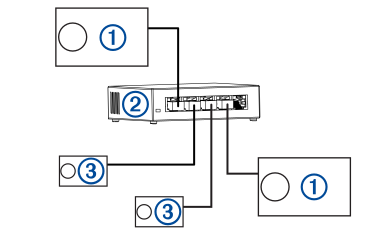
|
|
Fusion PartyBus stereo |
|---|---|
|
|
Wired network switch, wired network router, or Garmin BlueNet 20 switch |
|
|
Fusion PartyBus zone stereo or remote control |