Status Indicator

The status LEDs on the top panel of the trolling motor indicate the status of the motor.
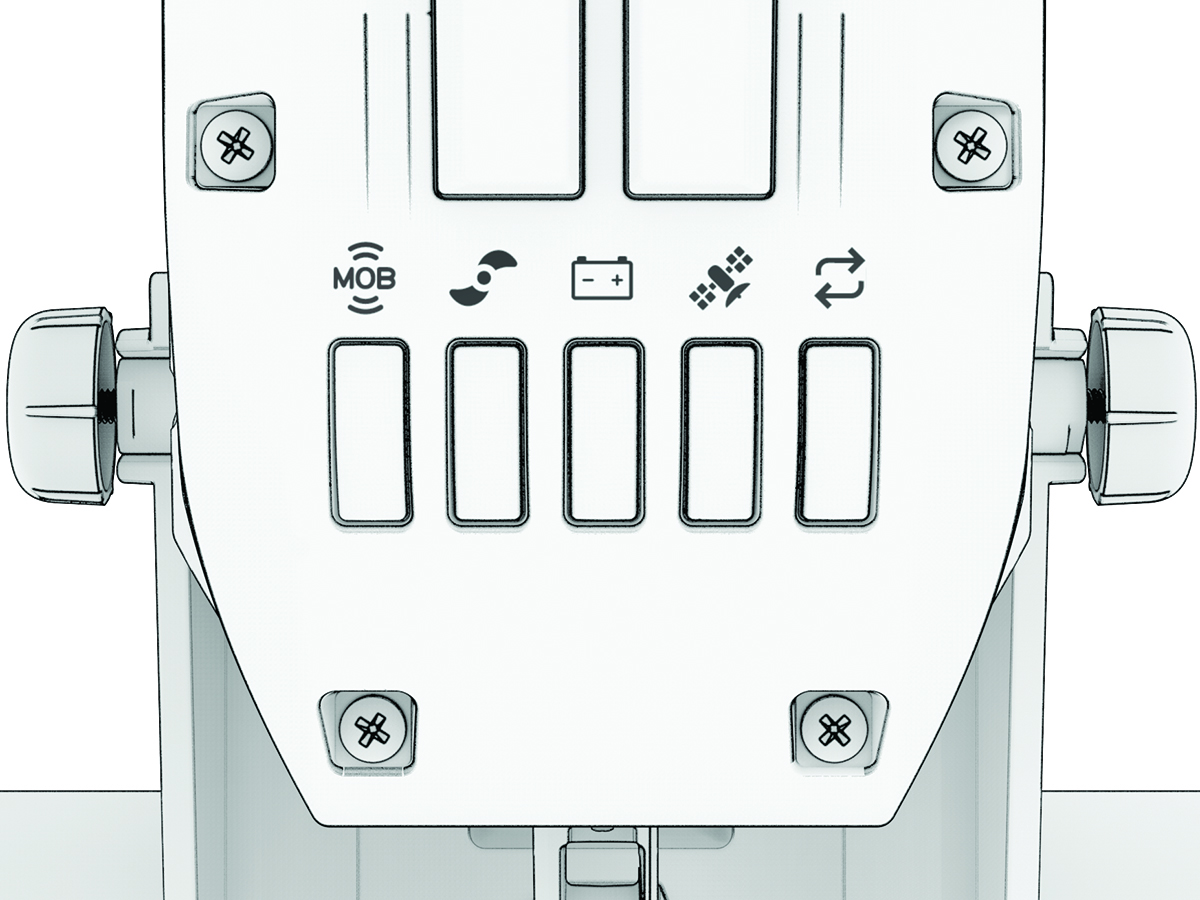

Status LEDs

MOB (man overboard) icon

Man Overboard (MOB) tag (MOB Tag):

  • Solid green: MOB tag is connected.

  • Flashing red: MOB tag connection has been lost. The propeller is disabled.

    NOTE: After the MOB tag connection is restored, you must press the MOB (man overboard) icon button on the MOB tag, or dismiss the notification on the remote control or on a connected chartplotter, before you can turn on the propeller.
  • Solid red: MOB tag is not connected. The propeller is disabled.

  • Flashing yellow: MOB tag is not connected, and MOB Tag Override Mode is on. The propeller is not disabled (Overriding the MOB Tag).

Propeller icon

Propeller and autopilot status:

  • Solid green: The propeller is on.

  • Flashing green: Autopilot mode is enabled.

  • Off: The propeller is off.

Battery icon

Battery status:

  • Solid green: The battery level is good.

  • Solid yellow: The battery level is medium.

  • Solid red: The battery level is low.

  • Flashing red: The battery level is critically low.

NOTE: By default, the battery level indicator is optimized for lithium iron phosphate batteries (Battery Management Settings).

Satelite icon

GPS status:

  • Solid green: The motor has a good GPS signal.

  • Solid yellow: The motor has a poor GPS signal.

  • Solid red: The motor does not have GPS signal.

Sync icon

Status:

  • Solid green: There are no errors.

  • Solid blue: The motor is in pairing mode.

  • Solid red: An error has occurred1.

  • Flashing red: A critical error has occurred.

All

Alternating flashing green: The motor, remote control, or foot pedals are installing a software update.

1 After resolving the error, you may need to turn the motor off and back on again to clear the red error LED.
GUID-91136105-7EB2-442E-8C25-7B4CF00FC466 v2
November 2025