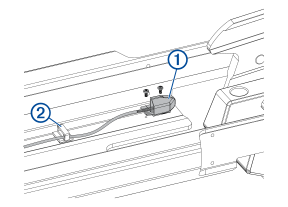
Using a #0 Phillips screwdriver, remove the position sensor from the upper link of the mount.
Using needle-note pliers, open the cable clips to remove the position-sensor cable.
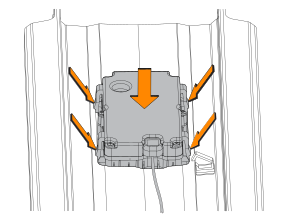
Pinch the tabs on the side of the display panel, and push it out of the upper link from the back.
Feed the cable from the replacement display panel through the upper link, taking care to feed the cable completely through the upper link.
NOTICE
Use caution when installing the replacement display panel to avoid pinching the cable between the display panel and the upper link. A damaged position sensor cable may cause damage to the drive system when stowing the motor.
Secure the replacement display panel by placing it in the upper link and pushing until it snaps into place.
Using a #0 Phillips screwdriver, secure the position sensor to the mount.
If necessary, install new cable clips to secure the position sensor cable along its route.
TIP:When installing new cable clips, you should avoid the areas where cable clips were affixed before, to ensure the new cable clips will adhere well to the inside surface of the upper link.
Place the cable in the cable clips and close the cable clips to secure the cable.