Replacing the PCB
- Remove the coil cable from the steering system housing (Removing the Coil Cable from the Steering System).
- Open the electronics cover (Removing the Electronics Cover).
-
Carefully remove the tape covering the connectors.
This tape is required during reassembly.
-
Disconnect the three wire harnesses from the PCB.
NOTICE
Use extreme care when disconnecting and reconnecting the wire harnesses to the PCB to avoid damage to the cables and connectors.
-
Using a 29 mm wrench or socket, remove the nut on the electronics connector.
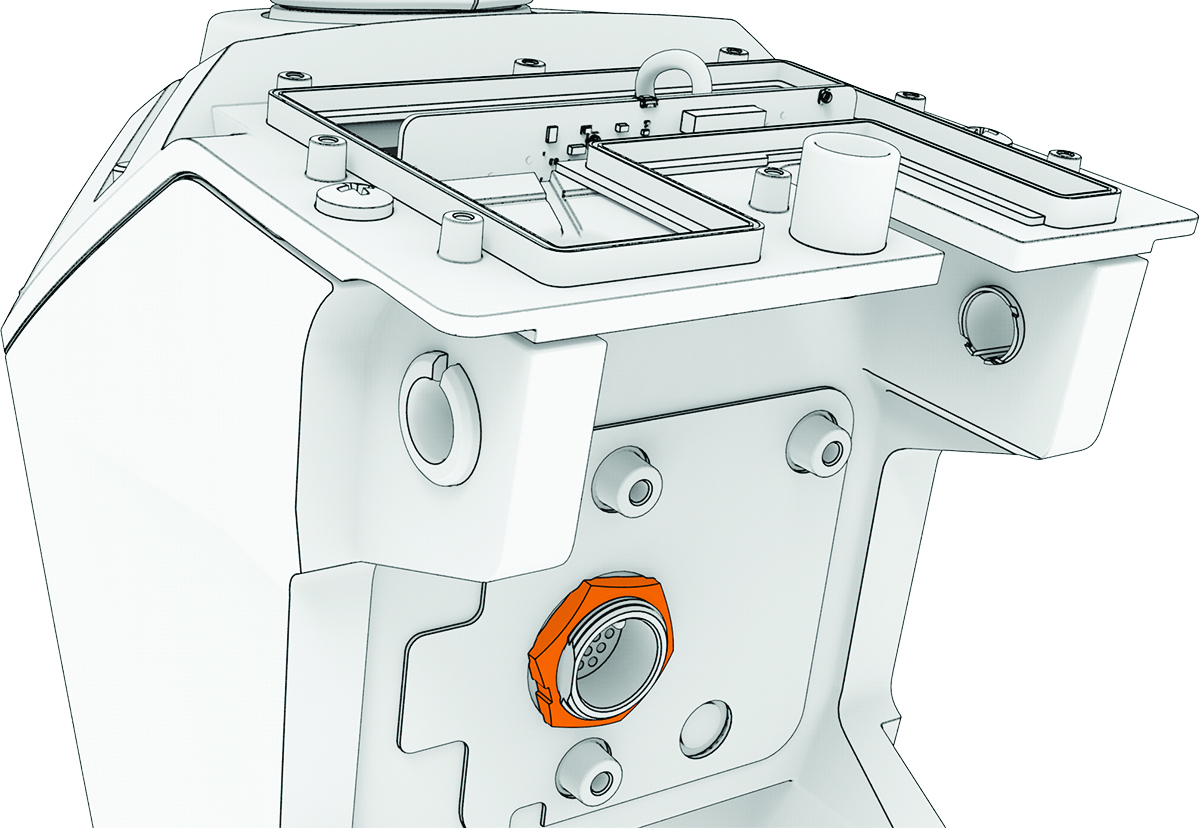
- Remove the PCB by lifting it up and out of the steering system housing.
- Install the circular gasket on the connector that feeds through the steering system housing.
- Place the replacement PCB into the steering system housing, feeding the electronics connector through the hole.
- Secure the replacement PCB to the steering system housing using the nut you removed in the previous step.
- Reconnect the three wire harnesses to the PCB.
- Place the tape you removed from the original PCB over the connectors on the replacement PCB.
- Reinstall the electronics cover (Reinstalling the Electronics Cover).