Putting Overview
The device measures and displays your putting stroke length ratio, which is the ratio of the follow through stroke and back stroke lengths when hitting a putt. The ideal putting stroke length ratio is 1 to 1.5 based on studies of professional golfers. This helps with natural acceleration through impact.
From the home screen, select  , start a putting training session, and then swipe left or right
to view the Overview
data screen.
, start a putting training session, and then swipe left or right
to view the Overview
data screen.
|
|
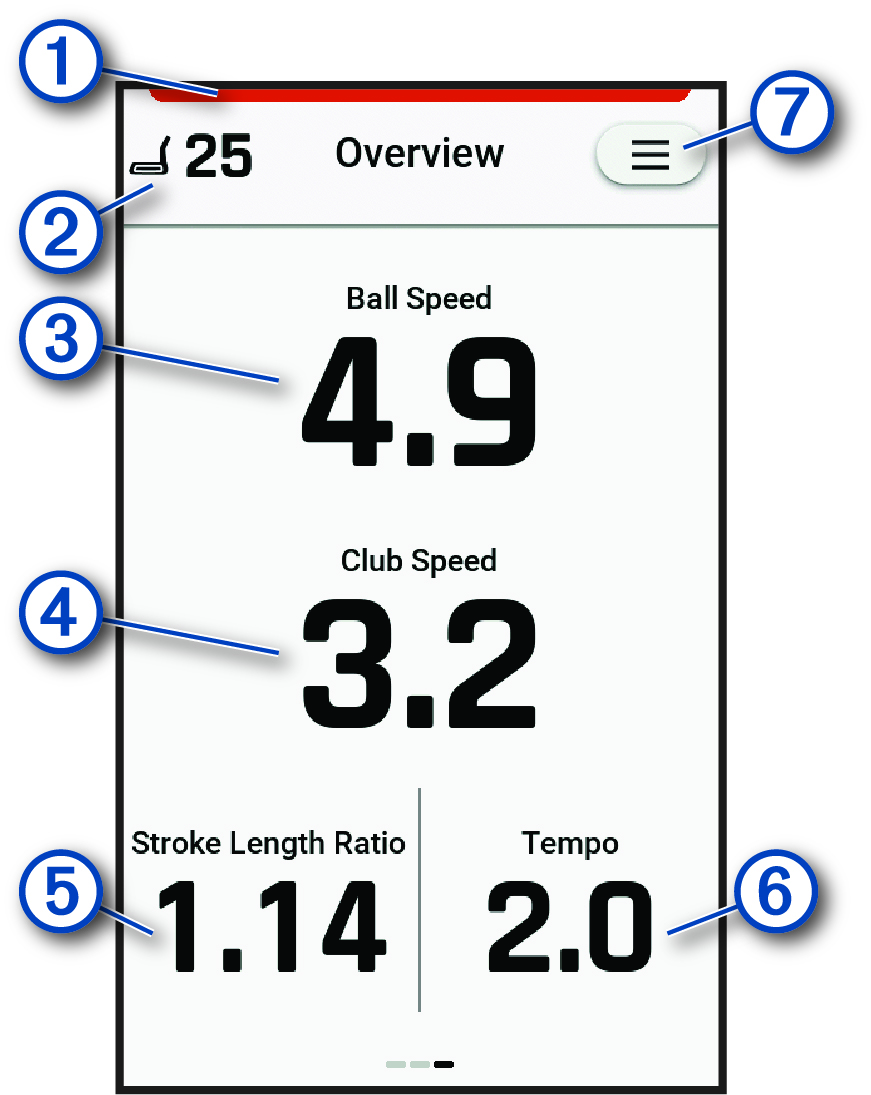
Indicates the radar status. Green indicates the radar is ready. Red indicates that the device is unable to measure. |
|---|---|
|
|
Displays the number of putts in the training session. |
|
|
Displays the ball speed. |
|
|
Displays the club head speed. |
|
|
Displays the putting stroke length ratio. NOTE:
The stroke length ratio is the follow through stroke length divided by the back stroke
length.
|
|
|
Displays the swing tempo (Tempo Training). NOTE:
The swing tempo is the backswing time divided by the downswing
time, expressed in a ratio.
|
|
|
Select to update your putting speed units, view instructional tips, or end the putting training session (Radar Training Settings). |