Tempo Training
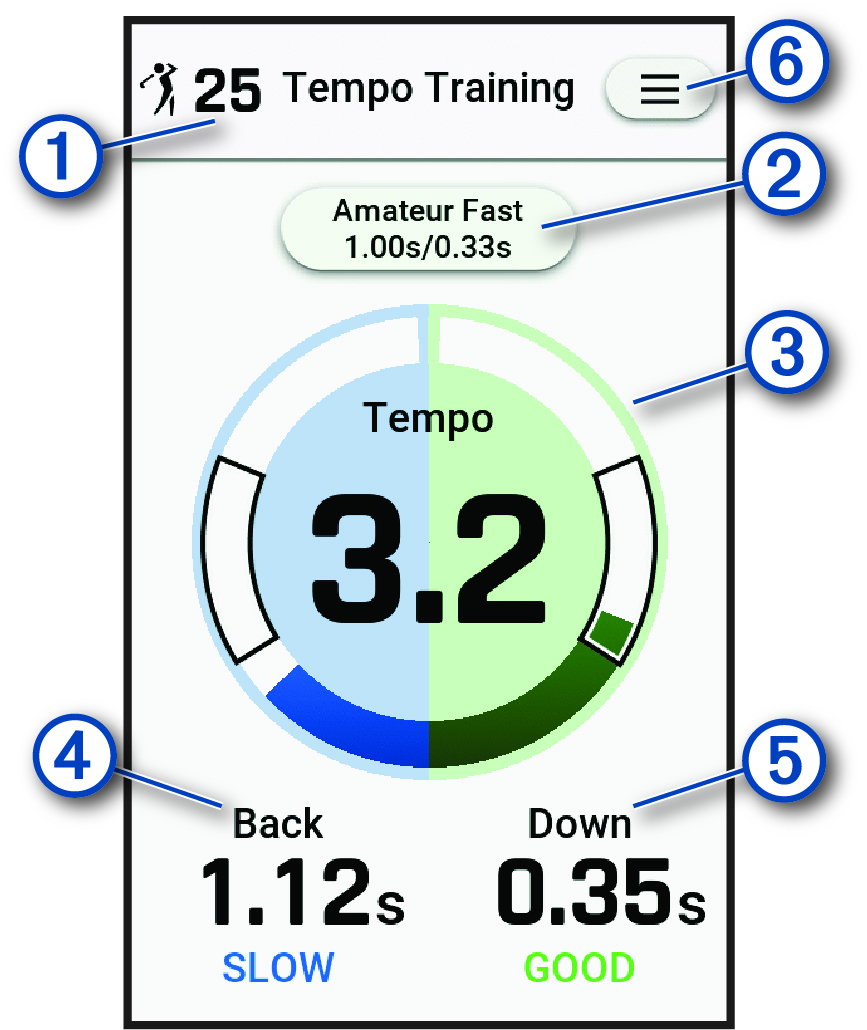
The device measures and displays your backswing time and downswing time. The device also displays your swing tempo. Swing tempo is the backswing time divided by the downswing time, expressed in a ratio. A 3 to 1 ratio, or 3.0, is the ideal swing tempo based on studies of professional golfers (The Ideal Swing Tempo).
From the home screen, select  , start a driving range or putting training session, and then
swipe left or right to view the Tempo Training data screen.
, start a driving range or putting training session, and then
swipe left or right to view the Tempo Training data screen.
|
|
Displays the number of drives or putts taken. |
|---|---|
|
|
Displays the tempo timing (backswing to downswing time ratio for driving sessions) or tempo goal (for putting sessions). Select to update the tempo times. |
|
|
Displays your swing tempo. NOTE:
Your swing tempo and swing times are highlighted in different colors to indicate how close you are to the target timing.
Green: Within 25% of the target time Red: Faster than the target time Blue: Slower than the target time |
|
|
Displays your backswing time. |
|
|
Displays your downswing time. |
|
|
Select to update training settings, view instructional tips, or end a training session (Radar Training Settings). |