Connecting the Cables in the Shaft Cap
Before you can connect the cables in the shaft cap, you must install the shaft cap (Installing the Shaft Cap).
-
Align the rings on the ends of the cables according to color.
You must stack the red cables together and stack the black cables together, aligning the flat sides of the connectors
 on the cables.
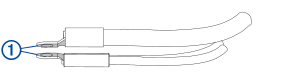
NOTE: If the cables are stacked incorrectly, you cannot close the shaft cap cover. -
Place the stacked cables
 over the stand outs in the shaft cap.
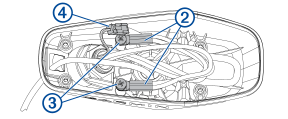
-
Using a #3 Phillips screwdriver, install the two screws and lock washers
 to secure the power cables onto the stand outs in the shaft cap.
Make sure the power cable terminals are firmly clamped under the screw heads.
You should use only hand tools to prevent stripping the stand outs when reattaching the leads.
-
Align both sections of the data cable connector
 , and push together to connect them.