On Course Practice
The on course practice mode allows you to practice on over 43,000 courses rendered with 3D technology.
In the Home Tee Hero app, select
Practice, select a course, and follow the on-screen
instructions to start a practice session.
NOTE:
Data from on course practice sessions is not saved.
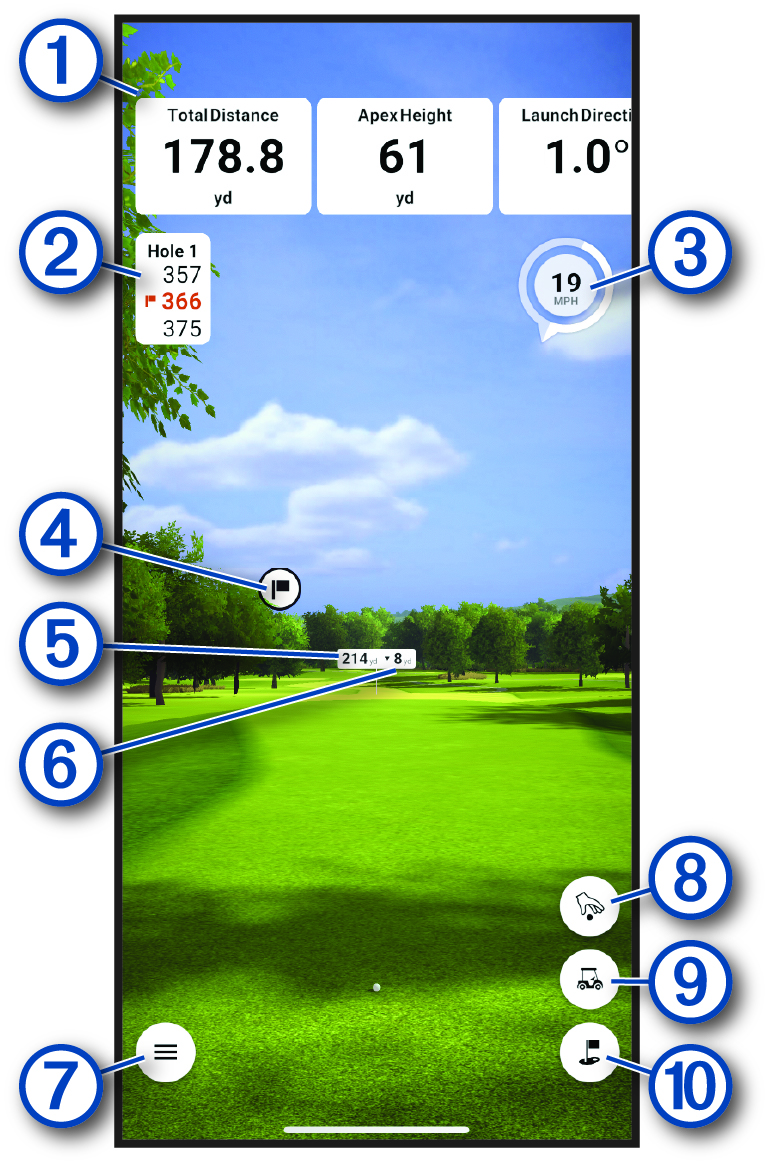
|
|
Swing metrics for the most recent shot. |
|---|---|
|
|
The distance to the front and back of the green, and to the pin. |
|
|
The wind speed and direction. |
|
|
The direction of the pin. |
|
|
The distance to the shot target.
TIP:
You can move the shot target by dragging it to the desired
location on the course.
|
|
|
The elevation difference between the location of the ball and the shot target. |
|
|
Opens the menu. |
|
|
Changes the shot location. |
|
|
Changes the hole. |
|
|
Changes to an overhead camera view. |