If you are mounting the bracket on fiberglass with screws, it is recommended to use a countersink bit to drill a clearance counterbore through only the top gel-coat layer. This will help to avoid cracking in the gel-coat layer when the screws are tightened.
Before you permanently mount the antenna, you must test the mounting location for correct operation (Testing the Mounting Location).
Using the surface-mount bracket as your mounting template, mark the three pilot-hole locations and trace the cable-hole in the center of the bracket.
Set the surface-mount bracket aside.
Do not drill through the bracket.
Use a 3.2 mm (1/8 in.) drill bit to drill the three pilot holes.
Use a 25 mm (1 in.) drill bit or hole saw to drill or cut the cable hole in the center.
Use the included M4 screws and a Phillips screwdriver to secure the surface-mount bracket to the mounting surface.
If the included M4 screws are too short, use M4 screws of appropriate length.
Route the cable through the center hole, and connect it to the antenna.
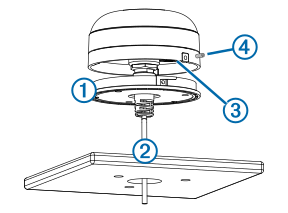
Verify the large gasket is in place on the bottom of the antenna, place the antenna on the surface-mount bracket, and twist it clockwise to lock it in place.
Use the M3 set screw and a 1.5 mm hex wrench to secure the antenna to the mounting bracket .
Route the cable away from sources of electronic interference.