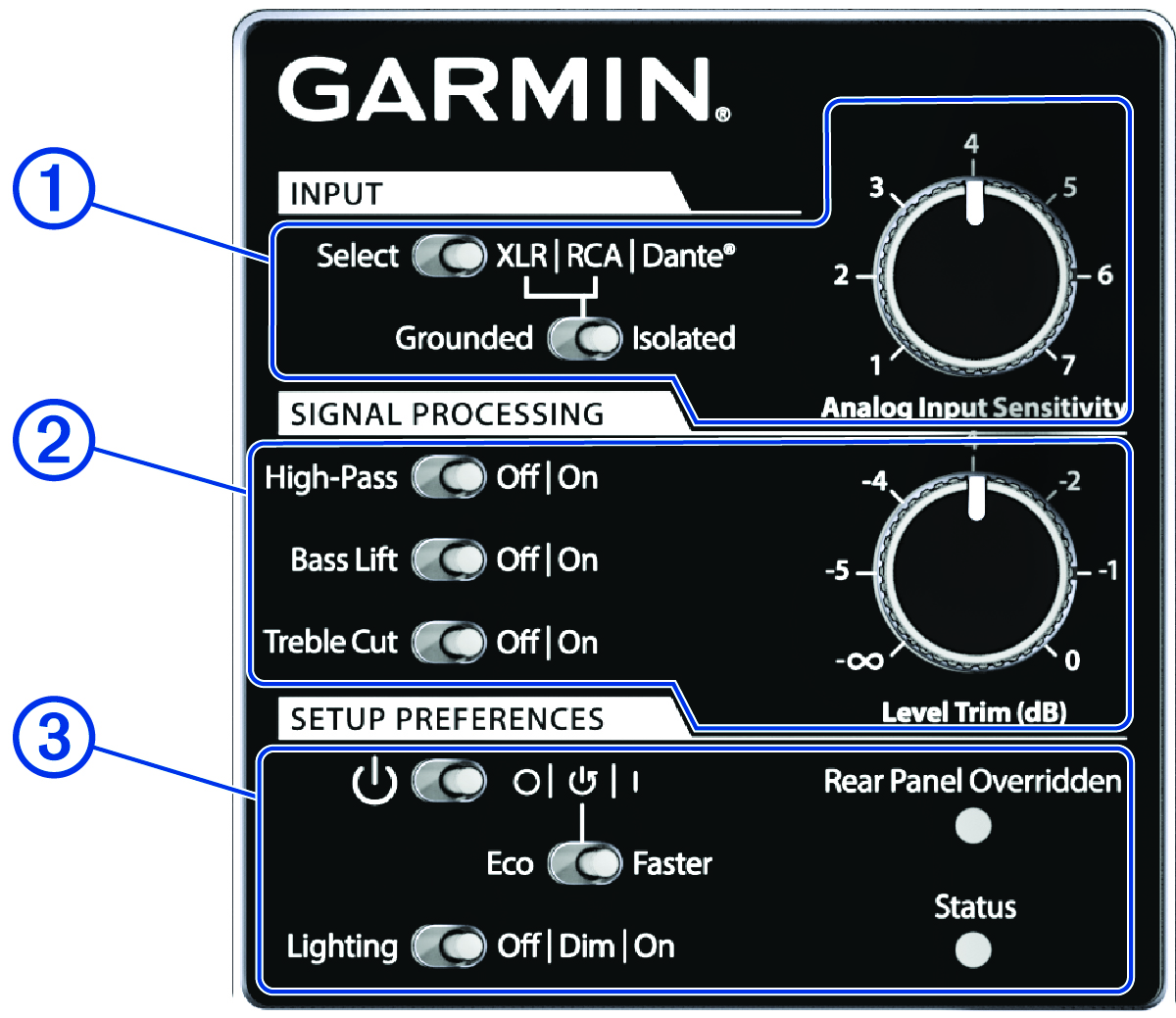
1 (Input Settings )
XLR | RCA |
Dante® : Sets
which input is active
Grounded /Isolated : Sets the input grounding method
when used with the analog inputs (XLR and RCA) to facilitate
quiet, hum-free operation with other connected audio
equipment
Analog Input Sensitivity : Adjusts the input level
for both analog inputs (XLR and RCA)
2 ( Signal Processing Settings )
High-Pass : Activates the internal, active
high-pass filter
Bass Lift : Activates the internal, active shelf
filter to gently boost the low-frequency response
Treble Cut : Activates the internal, active shelf
filter to attenuate the upper-frequency response
Level Trim (dB) : Allows fine adjustment of the
speaker's output level
3 ( Setup Preferences )
Power switch: Sets the method used to turn on the speaker
Eco /
Faster : Sets the operation preference of
the auto turn-on mode
Lighting : Sets the lighting intensity of
the top panel LED trim
Rear Panel Overridden : LED indicates when
the rear panel settings are disabled and under control by a
connected Primacy® CS
Status : Multicolor LED indicates the
speaker's status and operating condition (Status LED )