Installing the Dock in a FIAT Ducato Dashboard
Before you can install the dock in the dashboard, you must install the bracket on the dock.
The product package does not include the screws required to fasten the dashboard bracket to the dashboard.
The product package includes the screws required to fasten the dock bracket to the dashboard bracket.
-
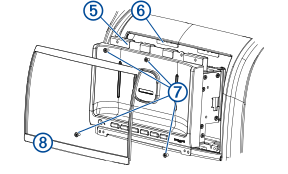
Place the upper dashboard bracket
 on the dashboard
  , aligning the holes on the bracket with the holes in the dashboard.

-
Secure the upper dashboard bracket to the dashboard using screws
 (not included).
-
Repeat this procedure for the lower dashboard bracket
 .
.
-
Place the dock in the dashboard, and connect the dock bracket
 to the dashboard bracket
  using the included screws
  .
.
-
Place the bezel
 on the front of the dock.
Magnets hold the bezel in place.