Installing the Transducer on a Trolling Motor Barrel
Labels identifying the parts bags required for this procedure:


You must secure the transducer cable to the shaft or other secure location during installation. Damage to the transducer cable wires or cable jacket can cause transducer failure.
-
Remove the rubber liner from parts bag
 .
.
-
Remove the hose clamp and trolling motor barrel mount from parts bag
 .
.
-
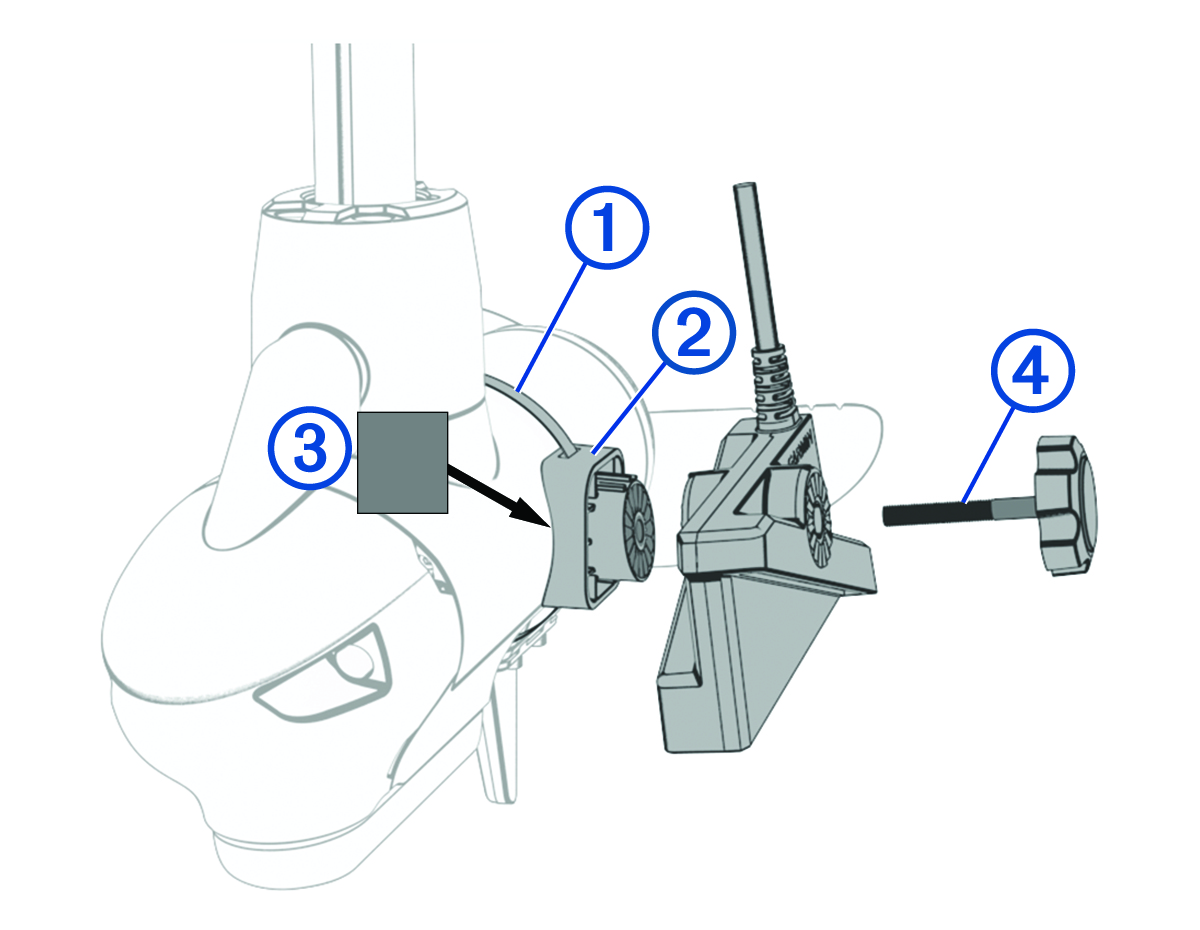
Insert the hose clamp
 through the slot on the trolling motor mount
  until equal lengths extend on both sides of the mount.
-
Place the rubber liner
 against the trolling motor barrel where you plan to secure the mount.
-
Remove the knob from parts bag .
-
Attach the transducer to the mount using the knob
 , and tighten the knob by hand.
NOTE: You can secure the transducer to the mount using the included low-profile hardware instead of the knob if you do not plan to switch transducer modes frequently during use (Installing the Transducer Using Low Profile Mounting Hardware).
, and tighten the knob by hand.
NOTE: You can secure the transducer to the mount using the included low-profile hardware instead of the knob if you do not plan to switch transducer modes frequently during use (Installing the Transducer Using Low Profile Mounting Hardware).