Do not use the stereo as a template when drilling the mounting holes because this may damage the display and void the warranty. You must only use the included template to correctly drill the mounting holes.
NOTICE
Be careful when cutting the hole to mount the stereo. There is only a small amount of clearance between the case and the mounting holes, and cutting the hole too large could compromise the stability of the stereo after it is mounted.
NOTICE
Do not apply grease or lubricant to the screws when fastening the stereo to the mounting surface. Grease or other lubricants can cause damage to the stereo housing.
Before you can mount the stereo in a new location on the mounting surface, you must select a location in accordance with the mounting considerations.
Adhere the template to the mounting surface.
Drill a hole inside the corner of the dashed line on the template.
Cut the mounting surface along the inside of the dashed line on the template.
Ensure the mounting holes on the stereo line up with the pilot holes on the template.
Using an appropriately sized drill bit for the mounting surface and screw type, drill the pilot holes.
Remove the template from the mounting surface.
Complete an action:
If you are installing the stereo in a dry location, place the included mounting gasket on the back of the stereo.
If you are installing the stereo in a location that is exposed to water, apply silicone-based marine sealant on the mounting surface around the cutout.
NOTICE
Do not install the included mounting gasket if you applied sealant to the mounting surface. Using sealant and the mounting gasket may reduce water resistance.
If you will not have access to the back of the stereo after installation, make the necessary wiring connections.
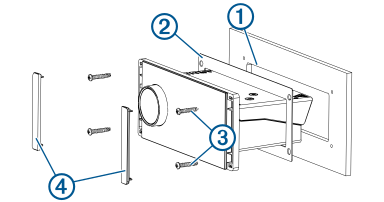
Secure the stereo to the mounting surface using the included screws .
You should hand-tighten the screws when securing the stereo to the mounting surface to avoid over tightening them.