Checking the Sacrificial Anodes

  1. Using a 9/16 in. (15 mm) socket, loosen the nut on the end of the propeller.
  2. Remove the propeller and set aside the nut, the lock washer, and the flat washer.
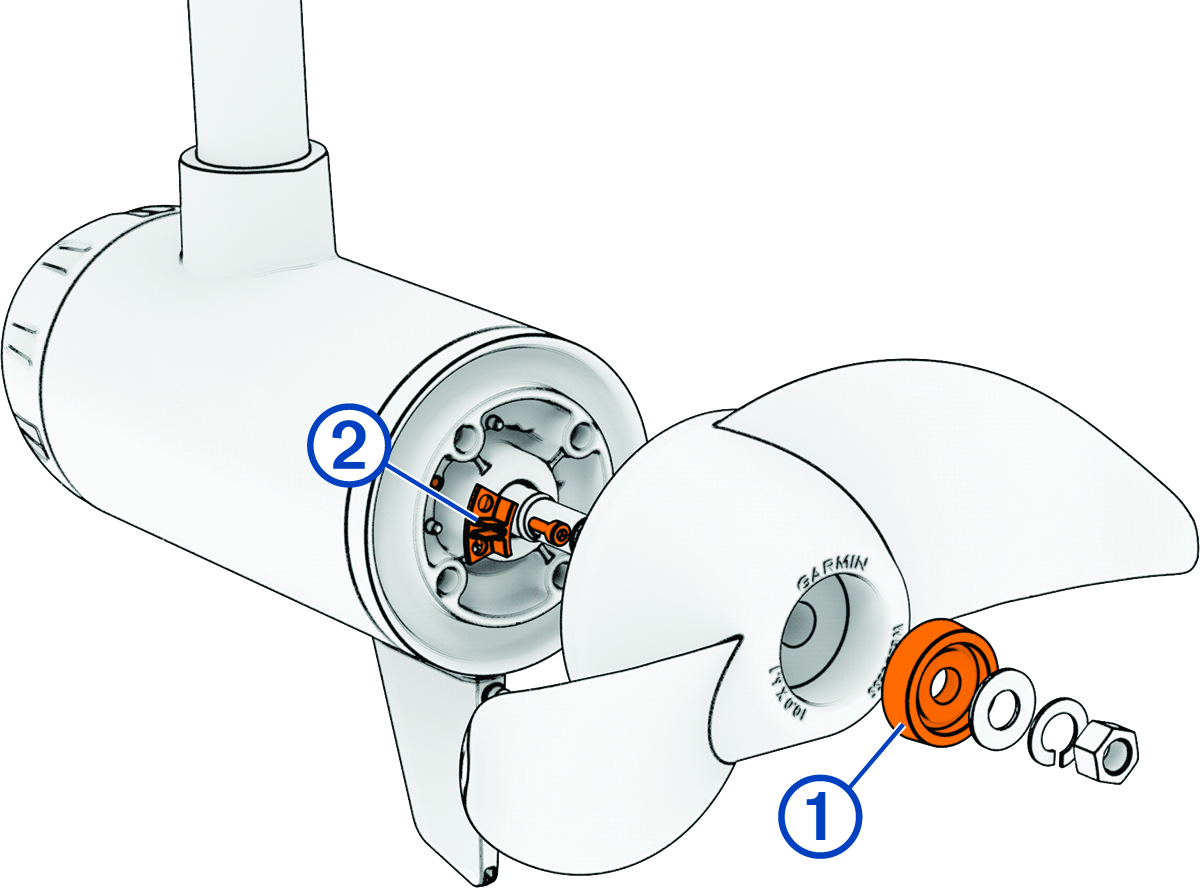
  3. Remove and examine the propeller anode 1.

    Sacrificial anodes with callouts
  4. Using a 3 mm hex key, remove and examine the propeller drive anode 2.
  5. Select an option:
    • If either anode is half of its original size or larger, clean it using a wire brush or sandpaper.

      NOTICE

      You should remove the anode from the motor before cleaning it with a wire brush or sandpaper. Cleaning the anode while it is installed on the motor could damage the motor, accelerate corrosion, and shorten the life of the motor.

    • If the anode is smaller than half of its original size, discard the anode and purchase a replacement.

You can purchase a set of replacement anodes at garmin.com/accessories/force_current_trolling_motor.

NOTICE

When reinstalling the propeller on the propeller drive motor, you must tighten the propeller nut to 16.27 N-m (12 lbf-ft.) to secure it properly.

GUID-91136105-7EB2-442E-8C25-7B4CF00FC466 v2
November 2025