Yamaha Engine and Motor Gauges
For the best experience monitoring and controlling your compatible Yamaha® engine or motor using this chartplotter, you must connect your engine or motor to the chartplotter using the appropriate interface adapter. If needed, contact your Yamaha dealer for more information.
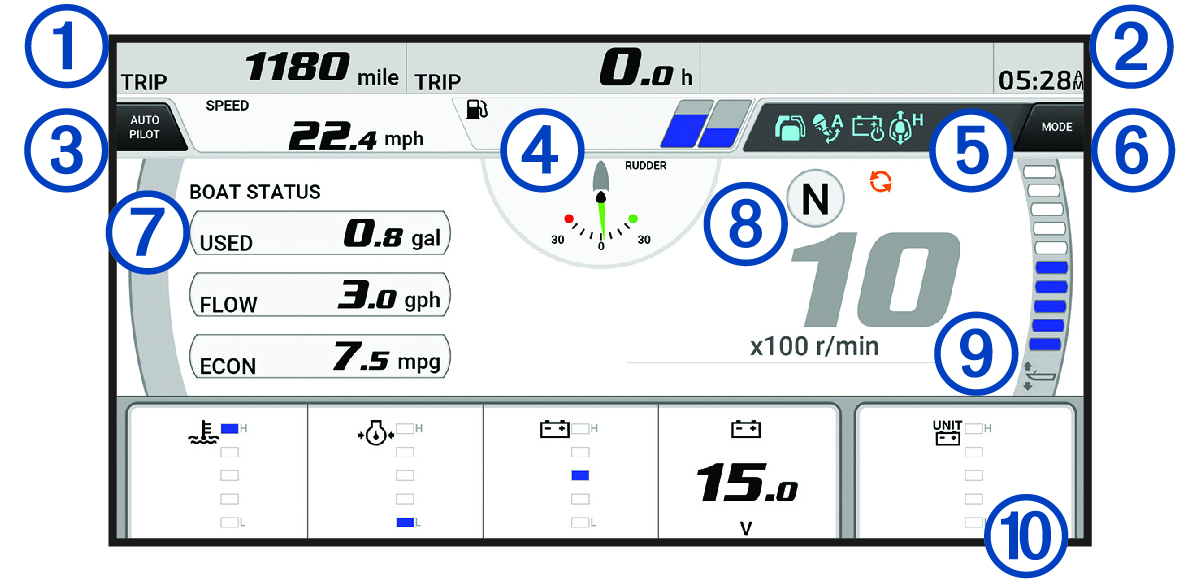
Select to view the Yamaha engine gauges.
This image is only one example of how this screen may appear based on the number and types of engines or motors connected to the engine network and throttle controller. Consult the owner's manual provided with your Yamaha engine, motor, or display for complete information.
|
|
Boat data fields Hold to replace the data. |
|---|---|
|
|
Current time Hold to view trip data. |
|
|
Select to toggle the autopilot bar on and off (Helm Master® EX). Select to set the joystick button for Set Point functions (Helm Master and Helm Master EX). |
|
|
Tank level information or battery level information Hold a tank or a battery to view detailed tank level sensor or battery level information. |
|
|
Status icons:
GPS signal strength (Helm Master) |
|
|
Select to set the Fish Point settings (Helm Master/Helm Master EX). Select to set the trolling speed (Helm Master/Helm Master EX/Mechanical RC/Digital Electronic RC (6X6/6X7)). |
|
|
Boat data fields Hold to replace the data. |
|
|
Shift position indicator Engine RPM |
|
|
Tachometer and trim angle Hold to change the background. |
|
|
Engine, motor, and boat data fields Hold to replace the data and change the gauge appearance. |