Device Overview
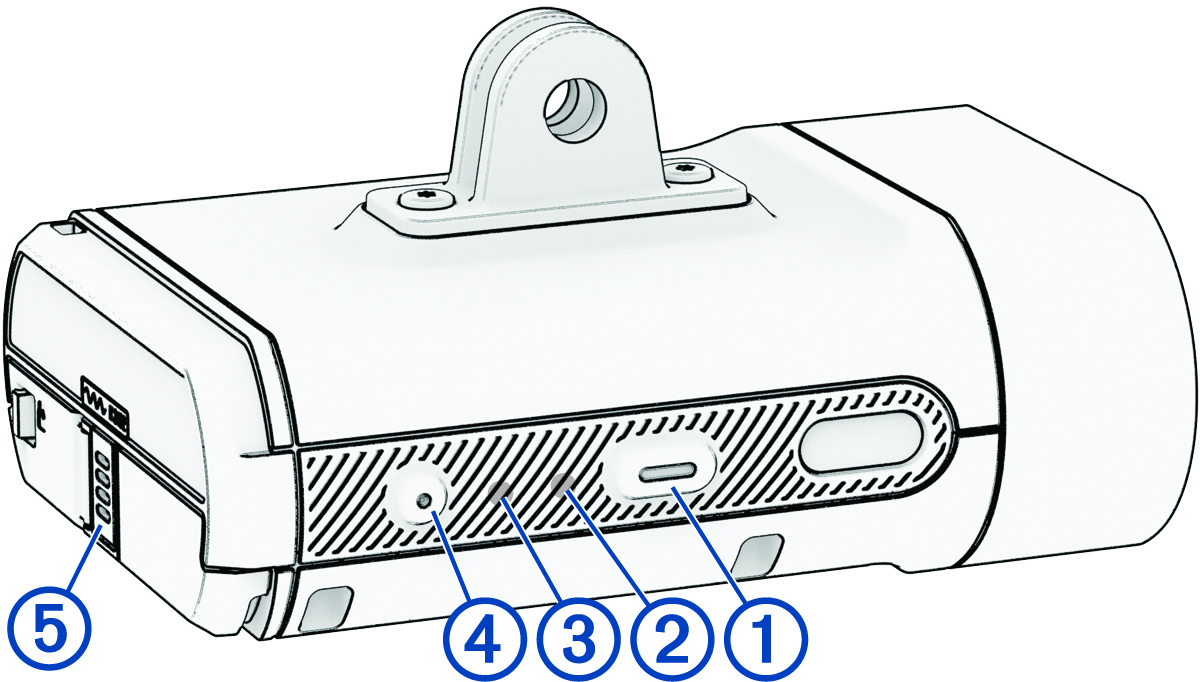
|
Device button |
Hold for 1 second to turn the device on and enter active mode. Press to change the device and light modes. When the device is off, hold for 2 seconds to enter pairing mode (Pairing the Varia Vue with Your Phone). Hold for 2 seconds to turn the device off. |
|---|---|
|
Device status LED |
Changes color and pattern based on the battery level, pairing status, device modes, and charging status ( Device Status LED). |
|
Camera status LED |
Changes color and pattern based on the camera status ( Camera Status LED). |
|
Camera button |
When the device is active, press to save a video or take a picture. When the camera is saving a video, hold for 2 seconds to stop saving. Hold for 4 seconds to turn the camera on or off. |
|
Microphone |
Captures audio. |


