Connecting the Device to Your Computer

NOTICE

To prevent corrosion, thoroughly dry the USB port, the weather cap, and the surrounding area before charging or connecting to a computer.

You can connect the device to your computer to install software updates or transfer videos and photos to your computer.

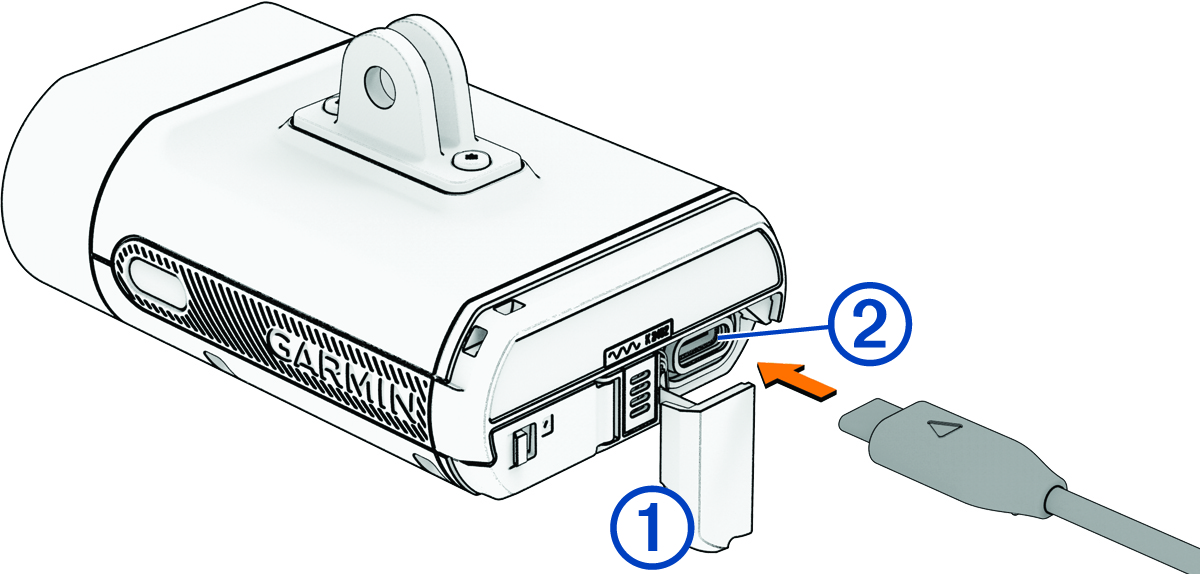
  1. Pull up the weather cap Callout number 1 from the USB port Callout number 2.

    Back view of the device with callouts
  2. Plug one end of the cable into the USB port on the device.
  3. Plug the other end of the cable into a computer USB port.

    Depending on your computer operating system, the device appears as either a removable drive or a removable volume on your computer (Video and Photo Format).

GUID-8DFBD71F-8C87-485C-BDD0-9B8FD2DE86DD v2
May 2025