Traffic Symbology with Optional GTX
The system displays traffic using the symbols shown in the following table if an optional GTX transponder with ADS-B capability is installed on the aircraft.
|
Traffic Symbol |
Description |
|---|---|
|
|
Traffic Advisory with directional information. Points in the direction of the intruder aircraft track. |
|
|
Traffic Advisory without directional information. |
|
|
Traffic Advisory out of the selected display range with directional information. Displayed at outer range ring at proper bearing. |
|
|
Traffic Advisory out of the selected display range without directional information. Displayed at outer range ring at proper bearing. |
|
|
Proximity Advisory with directional information. Points in the direction of the aircraft track. |
|
|
Proximity Advisory without directional information. |
|
|
Other Non-Threat traffic with directional information. Points in the direction of the intruder aircraft track. |
|
|
Other Non-Threat traffic without directional information. |
|
|
Traffic located on the ground with directional information. Points in the direction of the aircraft track. Ground traffic is only displayed when ADS-B is in Surface (SURF) Mode or own aircraft is on the ground. |
|
|
Ground traffic without directional information. Ground traffic is only displayed when ADS-B is in Surface (SURF) Mode or own aircraft is on the ground. |
|
|
Non-aircraft ground traffic with ADS-B directional information. Pointed end indicates direction of travel. Ground traffic is only displayed when ADS-B is in Surface (SURF) Mode or own aircraft is on the ground. |
|
|
Non-aircraft ground traffic without ADS-B directional information. Ground traffic is only displayed when ADS-B is in Surface (SURF) Mode or own aircraft is on the ground. |












A Traffic Advisory (TA), displayed as an amber circle or amber circle with an enclosed triangle, alerts the crew to a potentially hazardous intruding aircraft, if the closing rate, distance, and vertical separation meet TA criteria. A Traffic Advisory that is beyond the selected display range (off scale) is indicated by a half TA symbol at the edge of the page at the relative bearing of the intruder.
A Proximity Advisory (PA), displayed as a solid white diamond or triangle, indicates the intruding aircraft is within ±1200 feet and is within a six nautical mile range, but is still not considered a TA threat.
Other Non-Threat traffic, shown as a hollow white diamond or triangle, is displayed for traffic beyond a six nautical mile range that is neither a TA or PA.
Absolute altitude, when available, is displayed above or below the corresponding intruder symbol. The altitude of the intruder aircraft will show the altitude in MSL (based on the ownship baro-corrected MSL altitude).
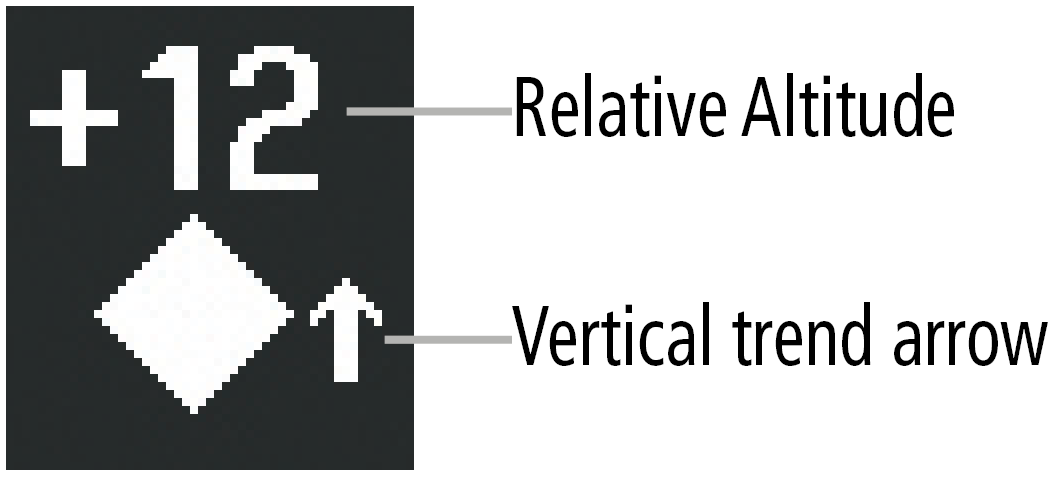
Relative altitude, when available, is displayed above or below the corresponding intruder symbol in hundreds of feet. When this altitude is above own aircraft, it is preceded by a ‘+’ symbol; a minus sign ‘-’ indicates traffic is below own aircraft.
The system displays the altitude vertical trend as an up/down arrow (for vertical speeds greater than 500 FPM in either direction) to the right of the intruder symbol. If the intruding aircraft is providing ADS-B track information, a motion vector line extending beyond the traffic symbol in the direction of the track may also be displayed when either absolute or relative motion vectors are enabled.

-
On-ground aircraft is equipped with a Mode S transponder.
-
On-ground aircraft is equipped with a Mode C transponder, and own aircraft’s radar altimeter (if installed) is displaying 1700’ AGL or less.