NMEA 0183 Device Connections
This diagram illustrates two-way connections for both sending and receiving data. You can also use this diagram for one-way communication.
To receive information from a NMEA® 0183 device, refer to items and when connecting the Garmin® device.
To transmit information to a NMEA 0183 device, refer to items and when connecting the Garmin device.
For either NMEA 2000® or NMEA 0183 systems, refer to item when making the basic power connections (Assigning Data to the Device), (Connecting the Device to Power).
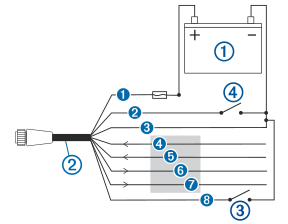
|
Item |
Description |
|---|---|
|
|
12 Vdc power source |
|
|
Power/NMEA 0183 cable |
|
|
Optional switch (not included)1 |
|
|
Accessory On switch (not included)2 |
|
Wire |
Garmin Wire Color |
Garmin Wire Function |
|---|---|---|
|
|
Red |
Power |
|
|
Yellow |
Accessory On (NMEA 0183 systems) |
|
|
Black |
Power ground |
|
|
Purple |
RxA (+) |
|
|
Gray |
RxB (-) |
|
|
Blue |
TxA (+) |
|
|
Brown |
TxB (-) |
|
|
Green |
Silent mode (optional)3 |