Radar Data Screen
The device can improve situational awareness. It is not a replacement for cyclist attentiveness and good judgement. Always maintain awareness of your surroundings, and operate the bicycle in a safe manner. Failure to do so could result in property damage, serious injury, or death.
You can add a radar data screen to remotely control your connected Varia RearVue 820 radar device and view radar data. The radar data screen shows a graphical representation of the road behind you, as you are riding. An icon represents an approaching vehicle. The size of the icon represents the size of the vehicle, as detected by the radar.
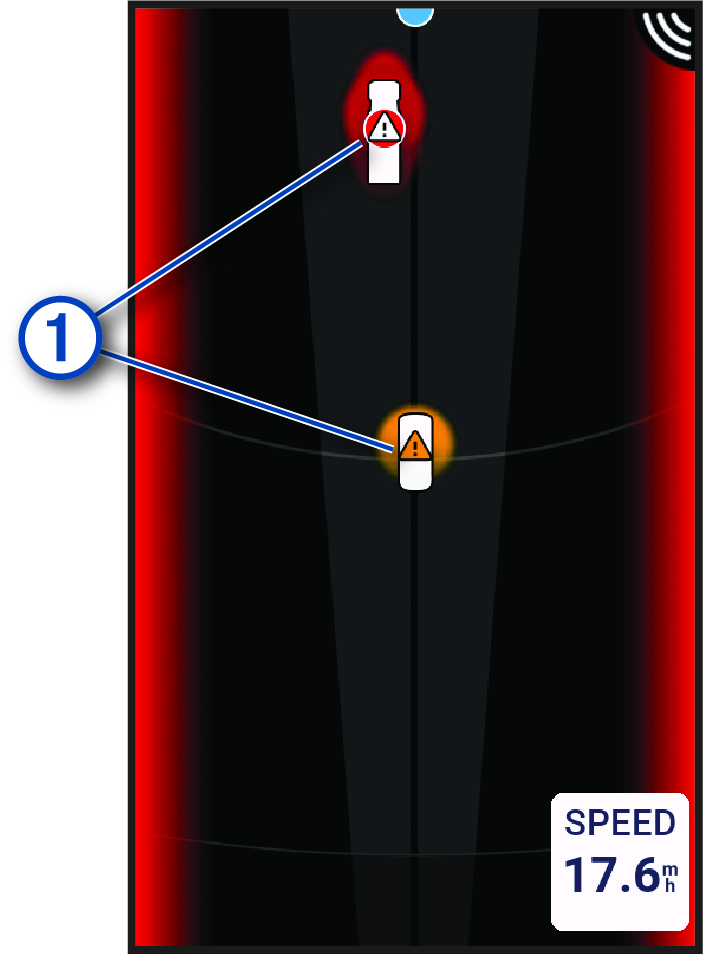
The vehicle icon moves up and across the screen as the vehicle approaches you, representing the vehicle's position relative to you.
The radar calculates a threat level based on vehicle size, speed, and other factors (Alert Settings). An orange glow
under the vehicle icon indicates that the vehicle is a mid-level threat. A red glow under the
vehicle icon with the  symbol over the vehicle icon indicate that the vehicle is a high-level
threat.
symbol over the vehicle icon indicate that the vehicle is a high-level
threat.