Customizing Boat Mode

You can customize which features to turn on when you enable the boat mode feature.

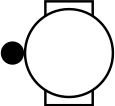
  1. Hold Upper-left button to open the controls menu.
  2. Select Boat Mode.

    The boat mode feature is enabled.

  3. From the watch face, hold Middle-left button, and select Watch Settings > Boat Mode Settings.
  4. Select an option:
    • To use the boat command feature with your paired Garmin® chartplotter, select Chartplotter, and select your chartplotter ( Using Boat Command).

    • To show boating data on the watch face, enable the Boat Mode Watch Face option.

    • To use separate app and activity lists for marine features, enable the Boat Mode List option.

GUID-3A4F9C4A-8735-46C0-8DA9-65F11400B150 v7
September 2026