Target Practice
From the home screen, select  , start a driving range session, and then swipe left or right to
view the Target Practice data screen.
, start a driving range session, and then swipe left or right to
view the Target Practice data screen.
, start a driving range session, and then swipe left or right to
view the Target Practice data screen. NOTE:
Before you can view the target practice data, you must set the Target Distance setting (Radar Training Settings). You can update
this setting anytime during a training session.
|
|
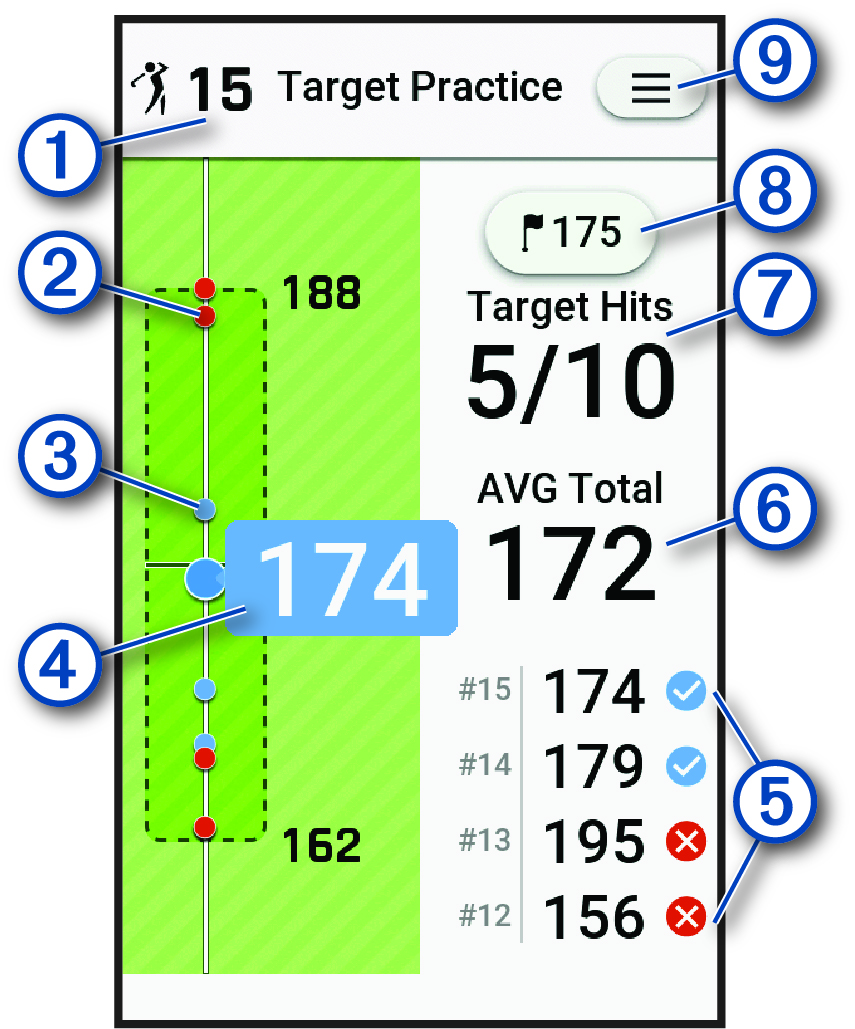
Displays the number of shots taken. |
|---|---|
|
|
Previous shots hit outside the target area, indicated by a red dot. |
|
|
Previous shots hit inside the target area, indicated by a blue dot. |
|
|
Displays the current distance target. |
|
|
The distance of the previous shots. |
|
|
The average target distance over all shots taken during the training session. |
|
|
Displays the number of target hits, over the number of shots attempted. |
|
|
Displays the target distance. Select to update the target distance for the driving range training session. |
|
|
Select to update driving range settings, view instructional tips, or end a driving range training session (Radar Training Settings). |