Device Overview
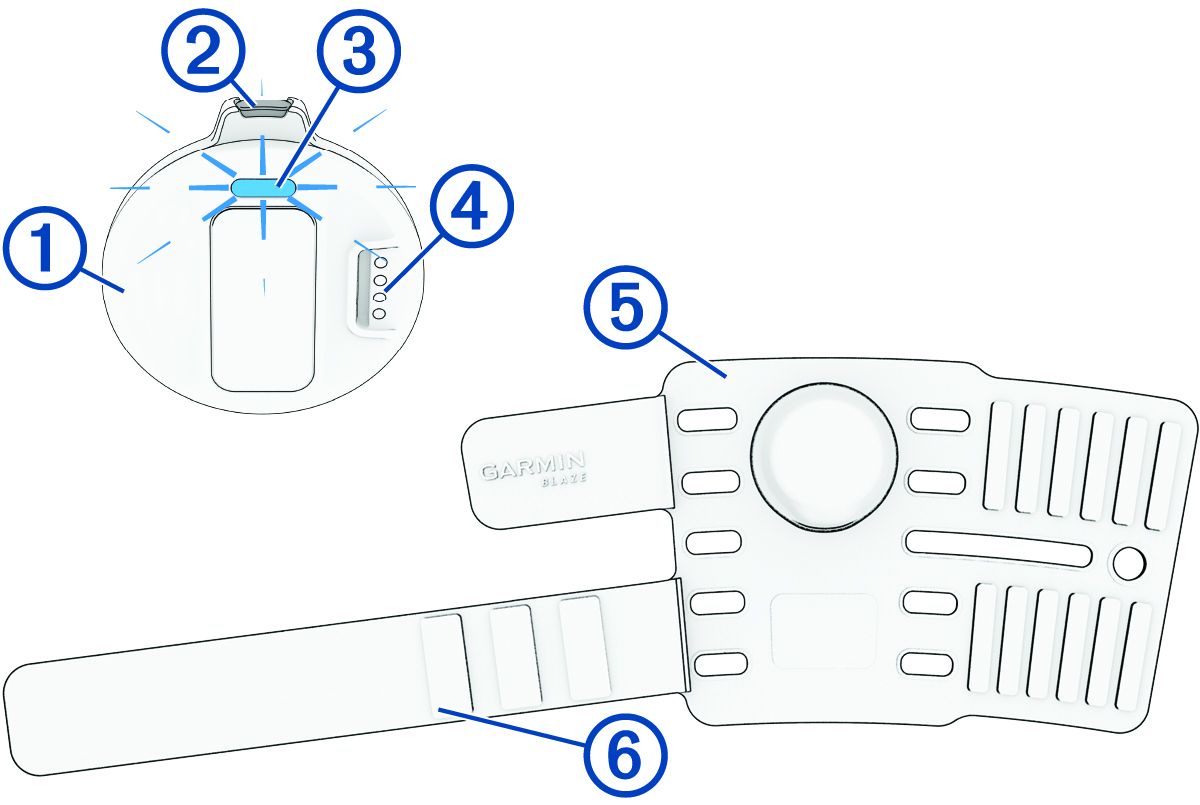
|
Sensor |
Insert the sensor in the tail wrap (Installing the Sensor in the Tail Wrap). |
|---|---|
|
Device button |
Press and quickly release to turn the sensor on. Hold to turn the sensor off. Press three times and then hold to reset the sensor (Resetting the Sensor). |
|
Status LED |
Indicates the sensor status (Sensor LED). |
|
Charging port |
Connect the USB cable to charge the sensor (Charging the Device). |
|
Tail wrap |
Place the tail wrap on the horse (Placing the Tail Wrap on Your Horse). |
|
Extension strap |
Wrap the extension strap around the tail wrap (Placing the Tail Wrap on Your Horse). |
Sensor LED
|
LED Activity |
Status |
|---|---|
|
Slowly flashing blue |
Sensor is turned on. |
|
Rapidly flashing blue |
Sensor is in pairing mode. |
|
Flashing green |
Sensor is communicating with a phone or watch. |
|
Solid green |
Sensor is on the charger and fully charged. |
|
Slowly flashing yellow |
Sensor is charging. |
|
Slowly flashing red |
An error occurred or the battery may be critically low. Charge the sensor, and reset the sensor if the issue persists (Resetting the Sensor). |
|
Solid red |
Sensor is in reset mode (Resetting the Sensor). |
|
Solid white |
Sensor is turning on or off or performing a software update. |