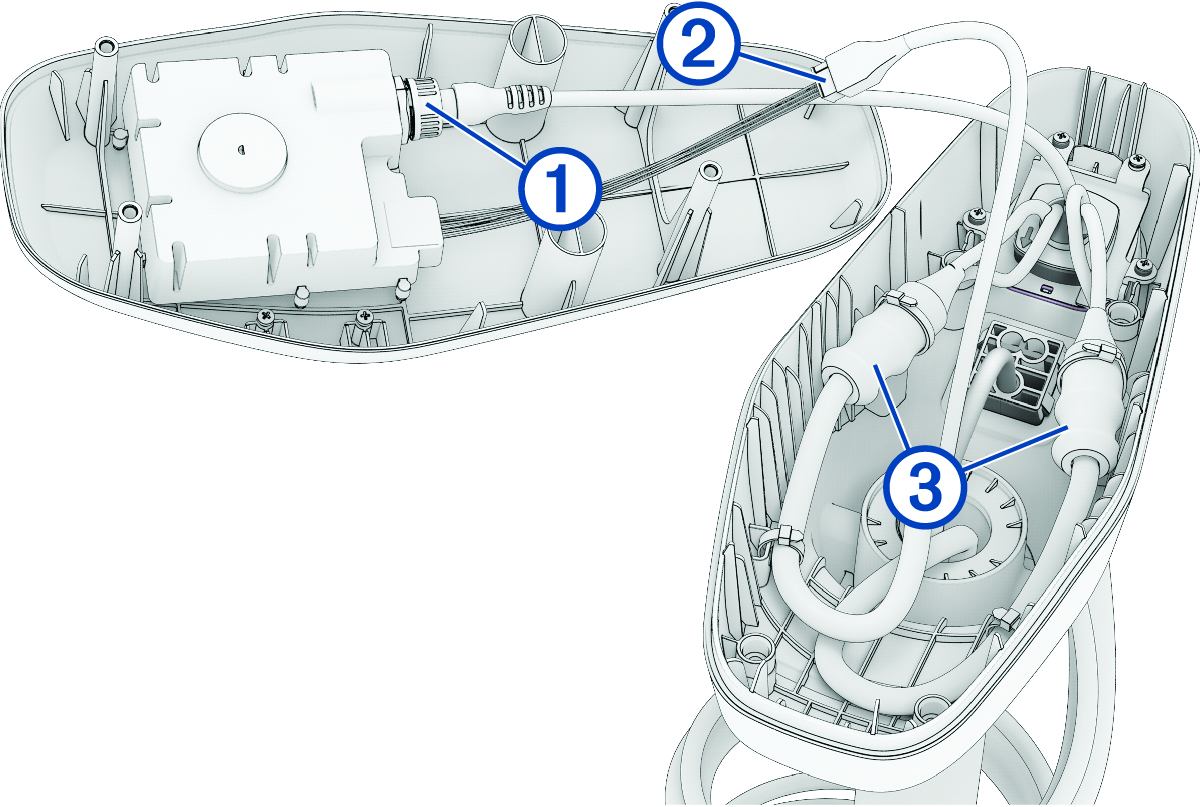
Reconnecting the Cables Add dielectric grease to the connectors on the GPS data cable , the motor data cable , and the motor power cables . Place the rubber sleeves on the power cables from the shaft, so that you can later slip them over the power cable connections. Reconnect the power cables and, using a 2.5 mm hex bit or wrench, tighten the set screws. Slip the rubber sleeves over the power cable connections. Secure the power cables to the sides of the shaft cap using cable ties, following the arrangement you noted before cutting the original cable ties. Reconnect the GPS data cable to the connector on the shaft cap cover, and tighten the collar. Reconnect the motor data cable, aligning the connectors so that the latch is engaged and the connection is secure. Parent Topic: Reconnecting the Shaft CablesHomeReconnecting the Shaft CablesReconnecting the Cables
Reconnecting the Cables Add dielectric grease to the connectors on the GPS data cable , the motor data cable , and the motor power cables . Place the rubber sleeves on the power cables from the shaft, so that you can later slip them over the power cable connections. Reconnect the power cables and, using a 2.5 mm hex bit or wrench, tighten the set screws. Slip the rubber sleeves over the power cable connections. Secure the power cables to the sides of the shaft cap using cable ties, following the arrangement you noted before cutting the original cable ties. Reconnect the GPS data cable to the connector on the shaft cap cover, and tighten the collar. Reconnect the motor data cable, aligning the connectors so that the latch is engaged and the connection is secure. Parent Topic: Reconnecting the Shaft CablesHomeReconnecting the Shaft CablesReconnecting the Cables