Disconnecting the Cables

  1. Take a picture or note the arrangement of the cables in the shaft cap, so you can reproduce it correctly when you reconnect the cables and close the shaft cap.
  2. Unscrew and disconnect the GPS data connector Callout number 1.

    Ensure the o-ring remains in place inside the connector.
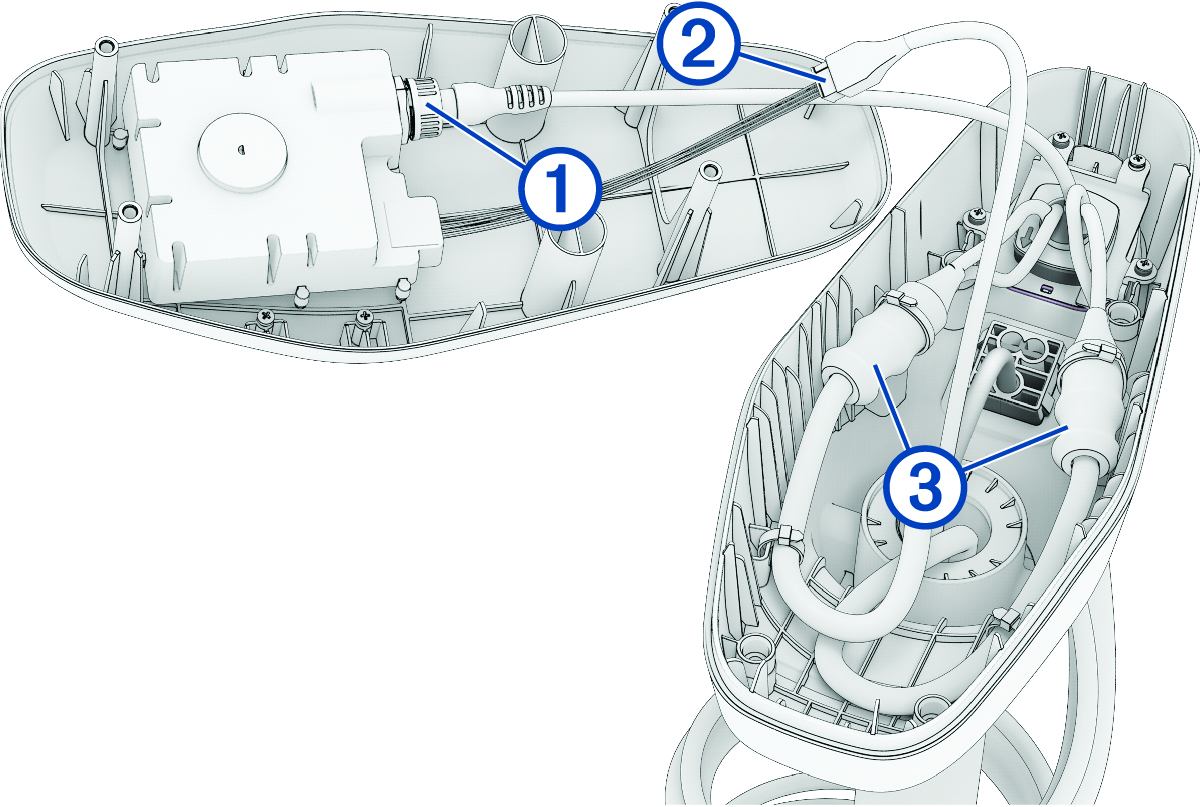

    View of the wires inside the shaft cap with callouts
  3. Release the latch and pull the connectors apart to disconnect the motor data cable Callout number 2.
    NOTICE

    To avoid damaging the cable, pull only on the connector body. Do not pull on the wire itself.

  4. Carefully cut off the zip ties that secure the cables to the sides of the shaft cap.
  5. Slide the rubber sleeves Callout number 3 away from the connection points on the power cables.
  6. Using a 2.5 mm hex bit or wrench, loosen the set screws that secure each power cable connection.
  7. Disconnect the power cables.
  8. Remove the rubber sleeves from the power cables and set them aside.
GUID-36A086C0-41D9-4098-8234-D26188424460 v2
March 2025