Shot Data
Each time you take a shot during a session, the chronograph records the shot automatically.
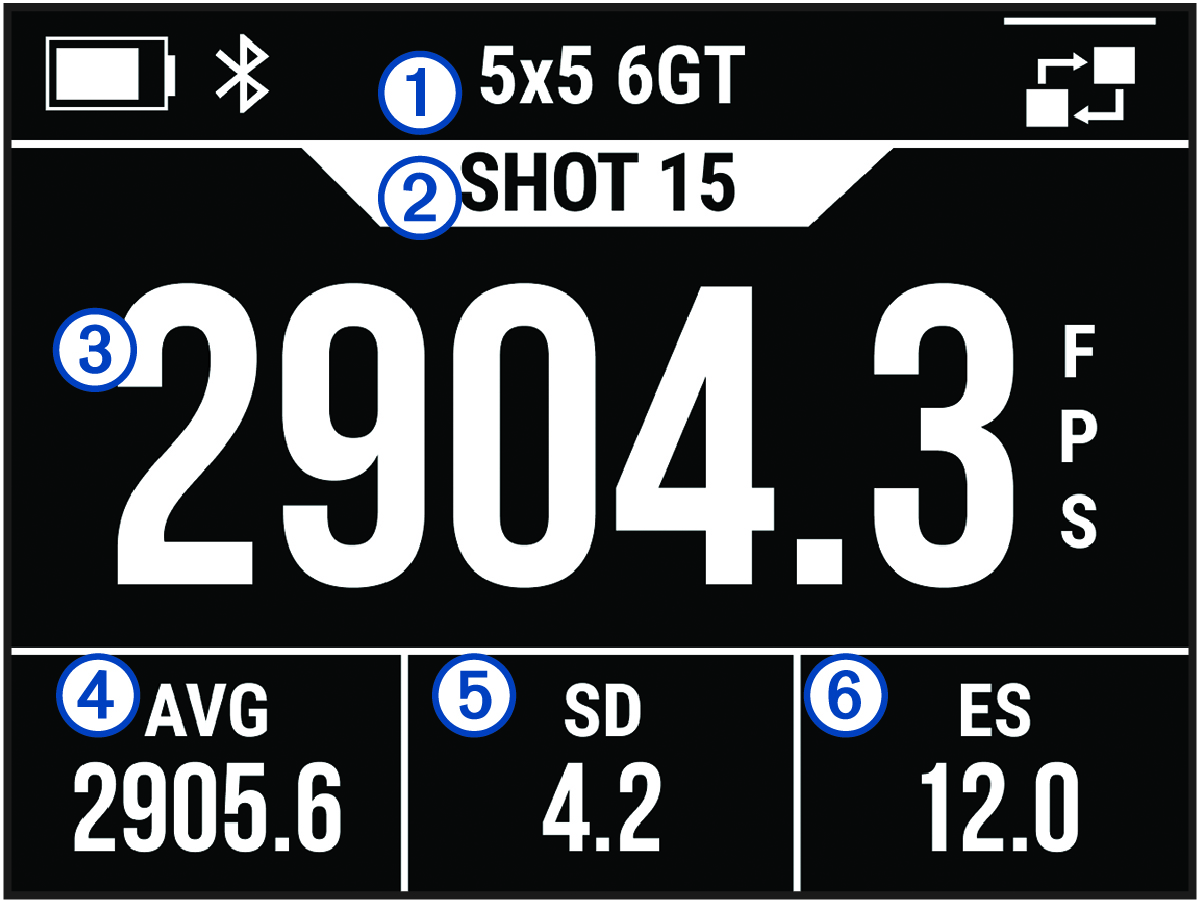
|
|
Session name |
|---|---|
|
|
Number of shots recorded |
|
|
Velocity of the most recent shot |
|
|
Average velocity recorded during the session (DATA FIELD 1) |
|
|
Standard deviation of shots recorded during the session (DATA FIELD 2) |
|
|
Extreme spread of shots recorded during the session (DATA FIELD 3) |
Changing Data Fields
You can change the data fields and the data field layout that displays your shot data.
-
Select an option:
-
To change data fields during a session, press OK, and select DATA FIELDS.
-
To change data fields before a session, select .
-
- If necessary, select LAYOUT to cycle through data field layouts (optional).
- Select a data field.
- Select a data type.
Data Fields
- AVERAGE (AVG)
-
Displays the average velocity recorded in the current session.
- AVERAGE KINETIC ENERGY (AVG KE)
-
Displays the average kinetic energy for shots recorded in the current session.
- AVERAGE POWER FACTOR (AVG PF)
-
Displays the average power factor for shots recorded in the current session.
- DEVIATION FROM AVERAGE (DEV/AVG)
-
Displays how far the velocity of the most recent shot deviates from the average velocity of shots in the current session.
- EXTREME SPREAD (EXT SPRD)
-
Displays the extreme spread of the shot velocities recorded in the current session. Extreme spread is the difference between the maximum and minimum velocities recorded.
- KINETIC ENERGY (KE)
-
Displays the kinetic energy calculated for the most recent shot.
NOTE: You must enable the PROJECTILE WEIGHT ENTRY setting to use this data field (Enabling Projectile Weight Entry). - MAXIMUM (MAX)
-
Displays the maximum velocity recorded in the current session.
- MINIMUM (MIN)
-
Displays the minimum velocity recorded in the current session.
- POWER FACTOR (PF)
-
Displays the power factor for the most recent shot. Power factor is a measurement of the momentum of the projectile.
NOTE: You must enable the PROJECTILE WEIGHT ENTRY setting to use this data field (Enabling Projectile Weight Entry). - SHOTS
-
Displays the number of shots taken in the current session.
- STANDARD DEVIATION (STD DEV)
-
Displays the standard deviation of shot velocities in the current session. The standard deviation is a number that shows how much recorded velocities deviate from the average velocity recorded. A high standard deviation means that the recorded velocities are more spread out from the average velocity recorded. A low standard deviation means that the recorded velocities are close to the average velocity recorded.
Viewing the Shot List
The shot list shows a list of your shots for a session.
-
To view the shot list for the current session, press OK, and select SHOT LIST.
-
To view the shot list for a previous session, select SAVED SESSIONS, select a session, and select SHOT LIST.
Changing the Shot List Data Field
Before you can select from all available data fields in the shot list, you must enable the PROJECTILE WEIGHT ENTRY setting (Enabling Projectile Weight Entry).
You can change the data field that displays with each shot on the shot list.
-
Select an option:
-
To change data fields during a session, press OK, and select DATA FIELDS.
-
To change data fields before a session, select .
-
- Select SHOT LIST DATA.
- Select a data field.
Deleting a Shot from the Shot List
You can delete shots from your shot list. This can be useful if there is a shot that you do not want to include in your session statistics.
-
Select an option:
-
To delete a shot from the current session, press OK, and select SHOT LIST.
-
To delete a shot from a previous session, select SAVED SESSIONS, select a session, and select SHOT LIST.
-
- Select a shot, and select DELETE.
Viewing the Session Summary
The session summary shows a list of statistics for your current session.
-
To view a summary of the current session, press OK, and select SESSION SUMMARY.
-
To view a summary of a previous session, select SAVED SESSIONS, select a session, and select SESSION SUMMARY.
Viewing Session History
You can view your shot details for previously recorded sessions.
- From the main menu, select SAVED SESSIONS.
- Select a session.
-
Select an option:
-
To view a summary of the session data, select SESSION SUMMARY.
-
To view a full list of shots recorded during the selected session, select SHOT LIST.
-