Connecting the Mount to Vehicle Power Plug the mini-USB end of the power cable into the mini-USB port on the powered mount. Plug the power cable into the included vehicle power adapter . Plug the vehicle power adapter into the power outlet in your vehicle. If necessary, turn on the vehicle ignition switch to provide power to the power outlet in your vehicle. Child Topics:Bare Wire USB CableParent Topic: InstallationHomeInstallationConnecting the Mount to Vehicle Power
Connecting the Mount to Vehicle Power Plug the mini-USB end of the power cable into the mini-USB port on the powered mount. Plug the power cable into the included vehicle power adapter . Plug the vehicle power adapter into the power outlet in your vehicle. If necessary, turn on the vehicle ignition switch to provide power to the power outlet in your vehicle. Child Topics:Bare Wire USB CableParent Topic: InstallationHomeInstallationConnecting the Mount to Vehicle Power
 into the mini-USB port
  on the powered mount.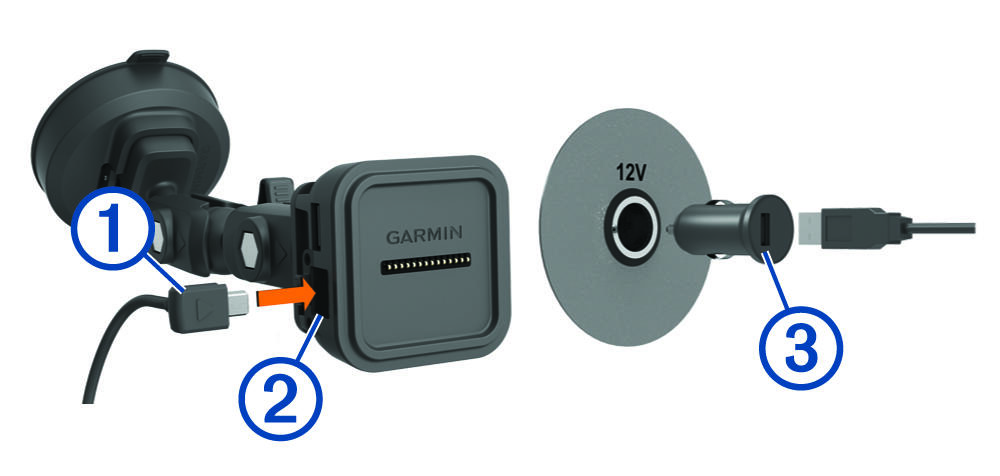
 . into the mini-USB port on the powered mount. .