Replacing the Cadence Sensor Battery

The device uses one CR2032 battery. The LED flashes red to indicate a low battery level after two revolutions.

  1. On the back of the sensor, push out the lever 1 and use the tab 2 to rotate the cover counter-clockwise until the marker 3 points to unlocked 4.
    NOTE: Some models do not have the lever and tab on the back of the sensor. You still have to rotate the battery cover counter-clockwise.
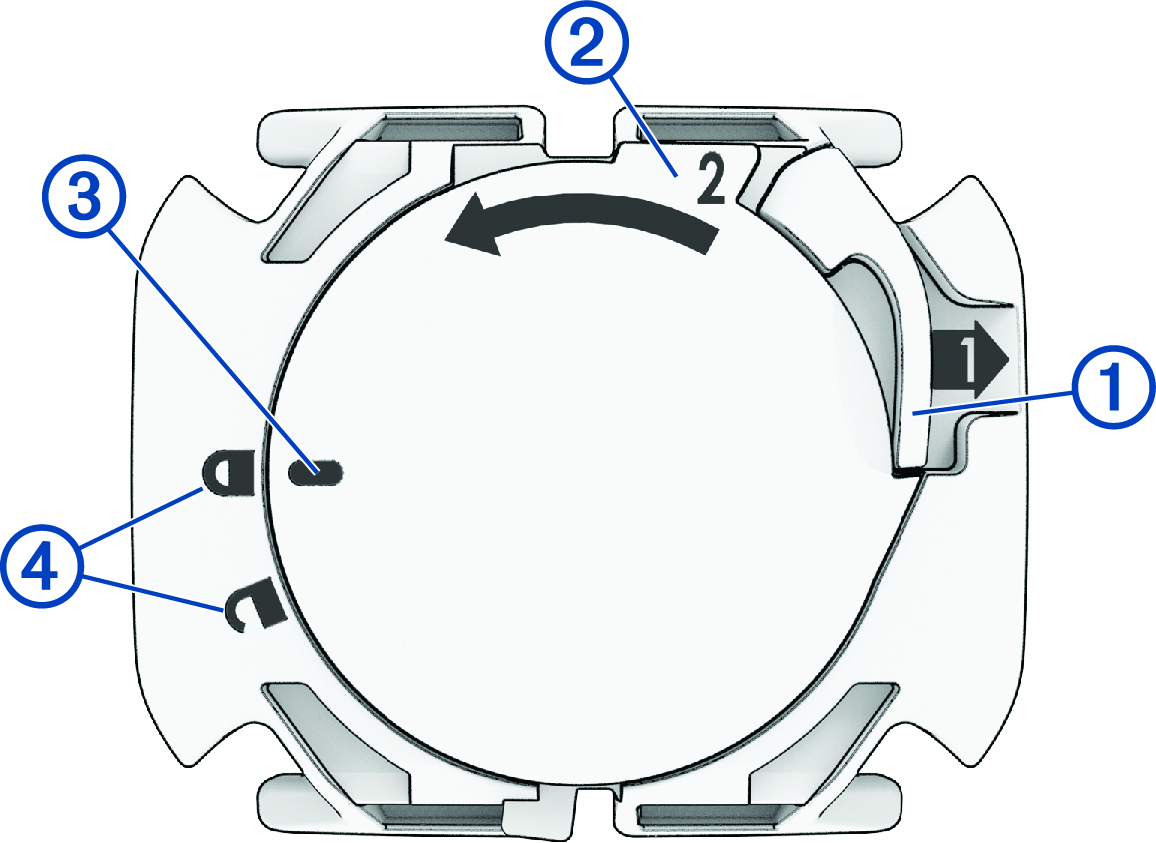
    Sensor battery with callouts
  2. Remove the cover and the battery.
  3. Wait 30 seconds.
  4. Insert the new battery into the cover, observing polarity.
    NOTE: Do not damage or lose the O-ring gasket.
  5. Align the cover so the marker points to unlocked.
    NOTE: The cover must be flush with the case of the sensor.
  6. Rotate the cover clockwise until the marker points to locked.

    The LED flashes red and green for a few seconds after battery replacement. When the LED flashes green and then stops flashing, the device is active and ready to send data.

GUID-08ACA9FC-DEE6-4C8D-8A95-F62181C512E9 v5
November 2025