Replacing the Speed Sensor Battery

The device uses one CR2032 battery. The LED flashes red to indicate a low battery level after two revolutions.

  1. Remove the sensor from the sleeve.
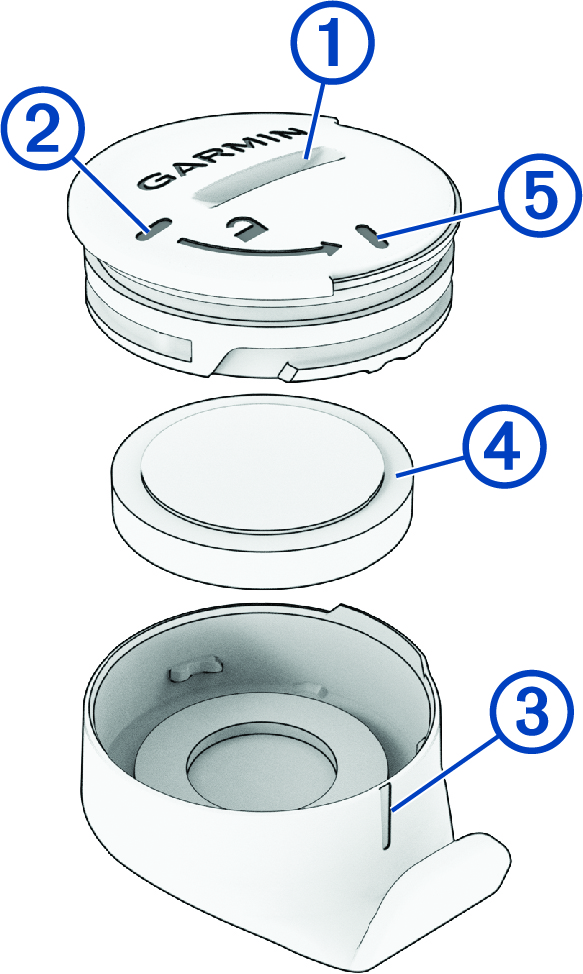
  2. Locate the circular battery cover 1 on the front of the sensor.

    Sensor battery with callouts
  3. Rotate the cover counter-clockwise until the marker 2 aligns with 3.
    NOTE: Some models do not have the same markers. You still have to rotate the cover counter-clockwise.
    TIP: You can use the sleeve to improve your grip on the case.
  4. Remove the cover and the battery 4.
  5. Wait 30 seconds.
  6. Insert the new battery into the cover, observing polarity.
    NOTE: Do not damage or lose the O-ring gasket.
  7. Align the cover markers 2 and 3.
    NOTE: The cover must be flush with the case of the sensor.
  8. Rotate the cover clockwise until the marker 5 aligns with 3.

    The LED flashes red and green for a few seconds after battery replacement. When the LED flashes green and then stops flashing, the device is active and ready to send data.

GUID-08ACA9FC-DEE6-4C8D-8A95-F62181C512E9 v5
November 2025