|

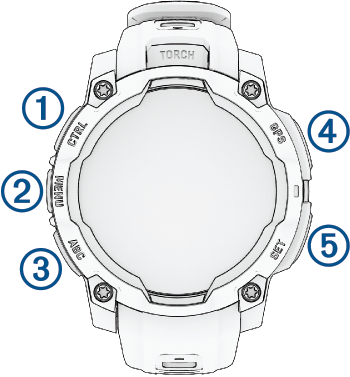
LIGHT
CTRL
|
- Press to turn on the device.
- Press to illuminate the screen.
- Quickly press twice to turn on or off the flashlight ().
- Hold for two seconds view the controls menu ().
- Hold for five seconds to request assistance ().
|
|

UP
MENU
|
- Press to scroll through the glance loop and menus.
- From the watch face, hold to access the main menu.
- Hold to access a contextual menu, if one is available in that part of the user interface.
|
|

DOWN
ABC
|
- Press to scroll through the glance loop and menus ().
- Hold to view the altimeter, barometer, and compass (ABC) screen.
|
|

GPS
|
- Press to choose an option in a menu.
- From the watch face, press to open the apps and activities menu ().
- Press to view the activity list and start or stop an activity ().
- Hold to view GPS coordinates and save your location.
|
|

BACK
SET
|
- Press to return to the previous screen.
- During an activity, press to record a lap, rest, or advance to the next workout step.
- Hold to view the clock menu ().
|