|


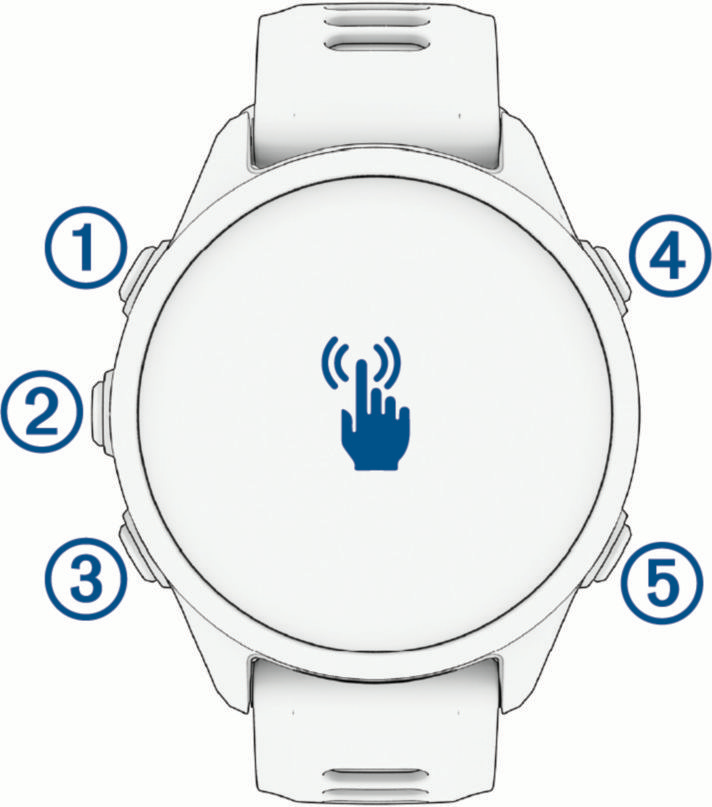
Upper-left button
|
- Press to illuminate the screen.
- Quickly press twice to turn the flashlight on or off (Using the Flashlight Screen).
- Hold for two seconds to view the controls menu (Controls).
- Hold for three seconds to turn on the device.
- Hold for five seconds to request assistance (Requesting Assistance).
|
|


Middle-left button
|
- From the watch face, press to view the notification center (Viewing Notifications).
- Press to scroll through the menus or data screens.
- From the watch face, hold to access the main menu.
|
|


Lower-left button
|
- From the watch face, press to scroll through the glances list (Viewing Glances).
- Press to scroll through the menus or data screens.
- Hold to view the music controls (Listening to Music).
|
|


Upper-right button
|
|
|


Lower-right button
|
- Press to return to the previous screen.
- During an activity, press to record a lap, rest, or advance to the next workout step.
|