Controls
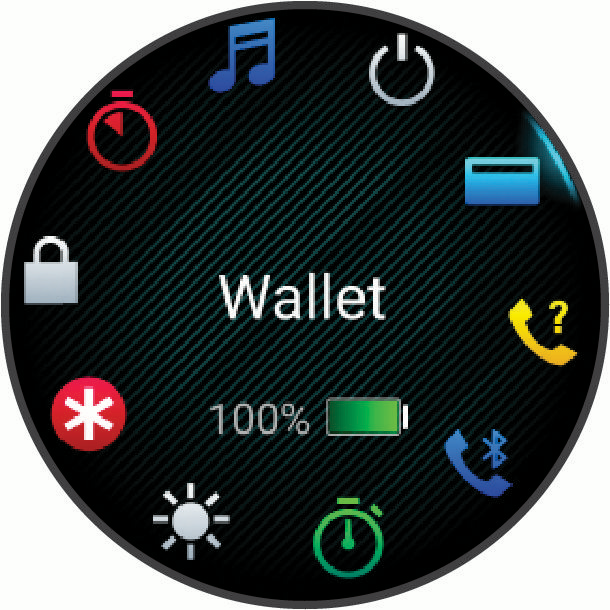
The controls menu lets you quickly access watch features and options. You can add, reorder, and remove the options in the controls menu (Customizing the Controls Menu).
From any screen, hold  .
.
|
Icon |
Name |
Description |
|---|---|---|
|
|
ABC |
Select to open the altimeter, barometer, and compass app. |
|
|
Airplane Mode |
Select to enable airplane mode to turn off all wireless communications. |
|
|
Alarm Clock |
Select to add or edit an alarm (Setting an Alarm). |
|
|
Alt. Time Zones |
Select to view the current time of day in additional time zones (Adding Alternate Time Zones). |
|
|
Altimeter |
Select to open the altimeter screen. |
|
|
Assistance |
Select to send an assistance request (Requesting Assistance). |
|
|
Barometer |
Select to open the barometer screen. |
|
|
Battery Saver |
Select to enable the battery saver feature (Customizing the Battery Saver Feature). |
|
|
Brightness |
Select to adjust the screen brightness (Display and Brightness Settings). |
|
|
Broadcast Heart Rate |
Select to turn on heart rate broadcasting to a paired device (Broadcasting Heart Rate Data). |
|
|
Calendar |
Select to view upcoming events from your phone calendar. |
|
|
Camera Controls |
Select to manually take a photo and record a video clip (Using the Varia Camera Controls). |
|
|
Clocks |
Select to open the Clocks app to set an alarm, timer, stopwatch, or view alternate time zones (Clocks). |
|
|
Compass |
Select to open the compass screen. |
|
|
Display |
Select to turn off the screen for alerts, gestures, and Always On Display mode (Display and Brightness Settings). |
|
|
Do Not Disturb |
Select to enable do not disturb mode to dim the screen and disable alerts and notifications. For example, you can use this mode while watching a movie. |
|
|
Find My Phone |
Select to play an audible alert on your paired phone, if it is within Bluetooth range. |
|
|
Flashlight |
Select to turn on the screen to use your watch as a flashlight (Using the Flashlight Screen). |
|
|
Garmin Share |
Select to open the Garmin Share app (Garmin Share). |
|
|
History |
Select to view your activity history, records, and totals. |
|
|
Lock Device |
Select to lock the buttons and the touchscreen to prevent inadvertent presses and swipes. |
|
|
Messenger |
Select to open the Messenger app (Using the Messenger Feature). |
|
|
Music |
Select to control music playback on your watch or phone. |
|
|
Notifications |
Select to view calls, texts, social network updates, and more, based on your phone notification settings (Enabling Phone Notifications). |
|
|
Phone |
Select to disable Bluetooth technology and your connection to your paired phone. |
|
|
Phone Assistant |
Select to connect to your phone’s voice assistant (Using the Phone Assistant). |
|
|
Power Off |
Select to turn off the watch. |
|
|
Pulse Oximeter |
Select to open the pulse oximeter app (Pulse Oximeter). |
|
|
Red Shift |
Select to turn the screen to shades of red to use the watch in low light conditions. |
|
|
Save Location |
Select to save your current location to navigate back to it later. |
|
|
Settings |
Select to open the settings menu. |
|
|
Sleep Mode |
Select to enable or disable Sleep Mode (Customizing the Sleep Focus Mode). |
|
|
Stopwatch |
Select to start the stopwatch (Using the Stopwatch). |
|
|
Sunrise & Sunset |
Select to view sunrise, sunset, and twilight times. |
|
|
Sync |
Select to sync your watch with your paired phone. |
|
|
Time Sync |
Select to sync your watch with the time on your phone or using satellites. |
|
|
Timer |
Select to set a countdown timer (Using the Countdown Timer). |
|
|
Touch |
Select to disable touchscreen controls. |
|
|
Voice Command |
Select to open the voice command app and say a command (Using Voice Commands). |
|
|
Volume |
Select to open the watch volume controls. |
|
|
Wallet |
Select to open your Garmin Pay wallet and pay for purchases with your watch (Garmin Pay). |
|
|
Water Ejection |
Select to play tones to eject water from the speaker and microphone ports. |
|
|
Weather |
Select to view the current weather forecast and current conditions. |
|
|
Wi-Fi |
Select to disable Wi-Fi communications. |