Performance Measurements
These performance measurements are estimates that can help you track and understand your training activities and race performances. The measurements require a few activities using wrist-based heart rate or a compatible chest heart rate monitor. Cycling performance measurements require a heart rate monitor and a power meter.
These estimates are provided and supported by Firstbeat Analytics™. For more information, go to Garmin.com/performance-data/running/.
NOTE: The estimates may seem inaccurate at first. The watch requires you to complete a few activities to learn about your performance.
VO2 max.: VO2 max. is the maximum volume of oxygen (in milliliters) you can consume per minute per kilogram of body weight at your maximum performance ().
Predicted race times: The watch uses the VO2 max. estimate and your training history to provide a target race time based on your current state of fitness ().
HRV status: The watch analyzes your wrist heart rate readings while you are sleeping to determine your heart rate variability (HRV) status based on your personal, long-term HRV averages ().
Performance condition: Your performance condition is a real-time assessment after 6 to 20 minutes of activity. It can be added as a data field so you can view your performance condition during the rest of your activity. It compares your real-time condition to your average fitness level ().
Lactate threshold: Lactate threshold requires a chest heart rate monitor. Lactate threshold is the point where your muscles start to rapidly fatigue. Your watch measures your lactate threshold level using heart rate data and pace ().
Power curve (cycling): The power curve displays your sustained power output over time. You can view your power curve for the previous month, three months, or twelve months ().
VO2 max. is the maximum volume of oxygen (in milliliters) you can consume per minute per kilogram of body weight at your maximum performance. In simple terms, VO2 max. is an indication of athletic performance and should increase as your level of fitness improves. The Forerunner device requires wrist-based heart rate or a compatible chest heart rate monitor to display your VO2 max. estimate. The device has separate VO2 max. estimates for running and cycling. You must run either outside with GPS or ride with a compatible power meter at a moderate level of intensity for several minutes to get an accurate VO2 max. estimate.
On the device, your VO2 max. estimate appears as a number, description, and position on the color gauge. On your Garmin Connect account, you can view additional details about your VO2 max. estimate, such as where it ranks for your age and sex.
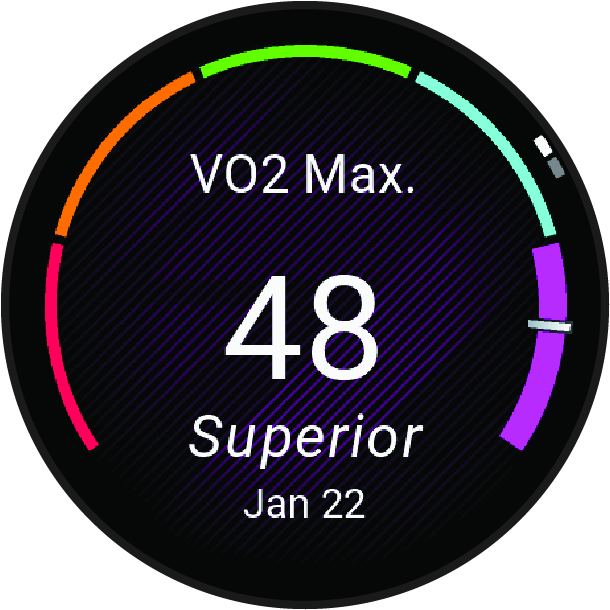
|
|
Purple |
Superior |
|
|
Blue |
Excellent |
|
|
Green |
Good |
|
|
Orange |
Fair |
|
|
Red |
Poor |





VO2 max. data is provided by Firstbeat Analytics. VO2 max. analysis is provided with permission from The Cooper Institute®. For more information, see the appendix (), and go to www.CooperInstitute.org.
Getting Your VO2 Max. Estimate for Running
This feature requires wrist-based heart rate or a compatible chest heart rate monitor. If you are using a chest heart rate monitor, you must put it on and pair it with your watch ().
For the most accurate estimate, complete the user profile setup (), and set your maximum heart rate (). The estimate may seem inaccurate at first. The watch requires a few runs to learn about your running performance. You can disable VO2 max. recording for ultra run and trail run activities if you do not want those run types to affect your VO2 max. estimate ().
- Start a running activity.
- Run for at least 10 minutes outdoors.
- After your run, select Save.
- Press UP or DOWN to scroll through the performance measurements.
Getting Your VO2 Max. Estimate for Cycling
This feature requires a power meter and wrist-based heart rate or a compatible chest heart rate monitor. The power meter must be paired with your watch (). If you are using a chest heart rate monitor, you must put it on and pair it with your watch.
For the most accurate estimate, complete the user profile setup () and set your maximum heart rate (). The estimate may seem inaccurate at first. The watch requires a few rides to learn about your cycling performance.
- Start a cycling activity.
- Ride at a steady, high intensity for at least 20 minutes.
- After your ride, select Save.
- Press UP or DOWN to scroll through the performance measurements.
Turning Off VO2 Max. Recording
You can disable VO2 max. recording for ultra run and trail run activities if you do not want these run types to affect your VO2 max. estimate ().
- Hold UP.
- Select Activities & Apps.
- Select Trail Run or Ultra Run.
- Select the activity settings.
- Select Record VO2 Max. > Off.