Replacing the Dash Cam Memory Card

You can replace the dash cam memory card to increase the storage capacity or to replace a card that has reached the end of its useful life. The dash cam requires a microSD® memory card with a capacity from 4 to 64 GB with a speed rating of Class 10 or higher.

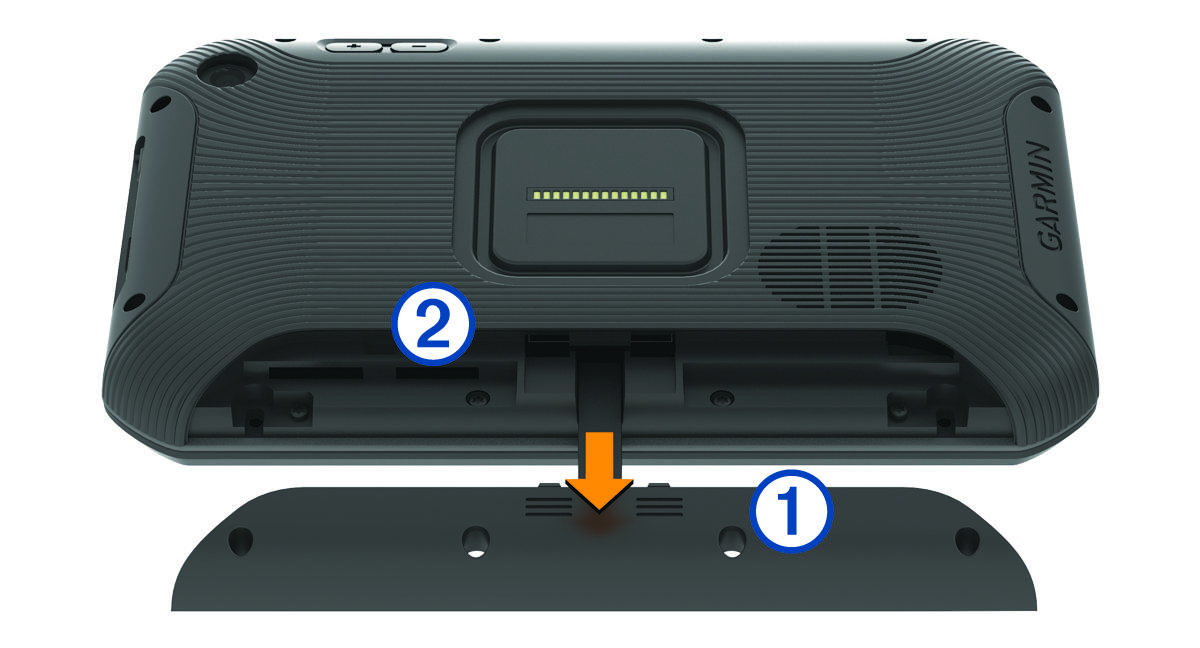
  1. Press the two marked areas and slide the back panel Call-out number one down to open it.


  2. Locate the memory card slot Call-out number two.
  3. Press the existing memory card in until it clicks, then release it.

    The existing memory card ejects from the slot.

  4. Remove the existing card from the slot
  5. Insert the new memory card into the slot.
  6. Press the card in until it clicks.
  7. Replace the panel and slide it upwards until the panel clicks into place.
Copyright © Garmin. All rights reserved.GUID-260D9C3C-8A96-42DD-8D3B-6F6B7C616338 v5