Home Screen
|
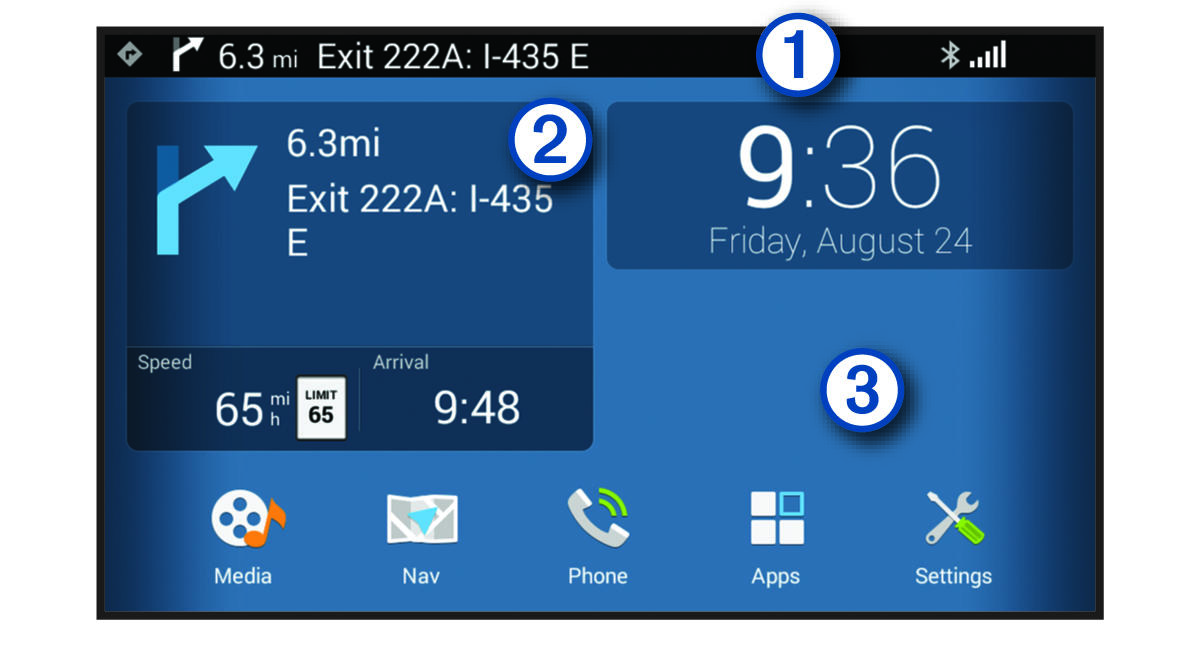
Status bar |
Displays navigation instructions, media information, status icons, and notification icons. Swipe down to view notifications or quickly change settings and backlight brightness. |
|---|---|
|
Navigation widget |
Displays navigation information. Select to open the navigation map. |
|
Background |
Hold to add widgets and shortcuts or change the wallpaper image. |
|
Media |
Select to open the media player. |
|
Nav |
Select to open the navigation map. |
|
Phone |
Select to place a call through your paired phone. |
|
Apps |
Select to view all apps. |
|
Settings |
Select to change the device settings. |


