GMM Monitor Connection Considerations
You can use a GMM™ monitor to view and control the GPSMAP® 8700. When connecting a GMM monitor to the GPSMAP 8700 device, you must observe these considerations.
-
The touchscreen functionality of the GMM monitor can be used to control one GPSMAP 8700 device.
-
Although it is recommended to use Garmin® DVI-D cables, high-quality third-party DVI-D cables may be used. Before you route a DVI-D cable, you should connect all devices to it for testing.
-
You must use an HDMI® to DVI-D cable or adapter.
-
You must connect the GMM monitor to the same power source as the GPSMAP 8700 device. If this is not possible, you must connect the devices to the same ground.
-
You must connect the GMM monitor to a NETWORK port on the GPSMAP 8700 device or to the same Garmin Marine Network as the GPSMAP 8700 device.
-
The touch data is sent over the Garmin Marine Network.
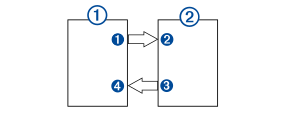
Devices
|
Item |
Device |
|---|---|
|
|
GPSMAP chartplotter |
|
|
GMM touchscreen monitor |


Connections
|
From |
To |
Cable |
|---|---|---|
|
Chartplotter's HDMI OUT port |
GMM monitor's MAIN DVI VIDEO IN port |
DVI-D cable with an HDMI adapter |
|
GMM monitor's GARMIN PROCESSOR BOX port |
Chartplotter's NETWORK port or the Garmin Marine Network |
Garmin Marine Network Cable |


