You are responsible for the safe and prudent operation of your vessel. Steer assist is a
feature that can provide information on steering your vessel. It does not control the helm
for you or relieve you of the responsibility of safely operating your boat. Avoid
navigational hazards and never leave the helm unattended.
Steer Assist is a set of sailing
features provided to help you steer on the optimal course while sailing. You must select or
import a polar table before you can use the Steer Assist
feature ( Polar Tables).
NOTE:Steer Assist is enabled
automatically when you select or load a polar table. To deactivate Steer Assist, select > Preferences > Navigation > Steer Assist.
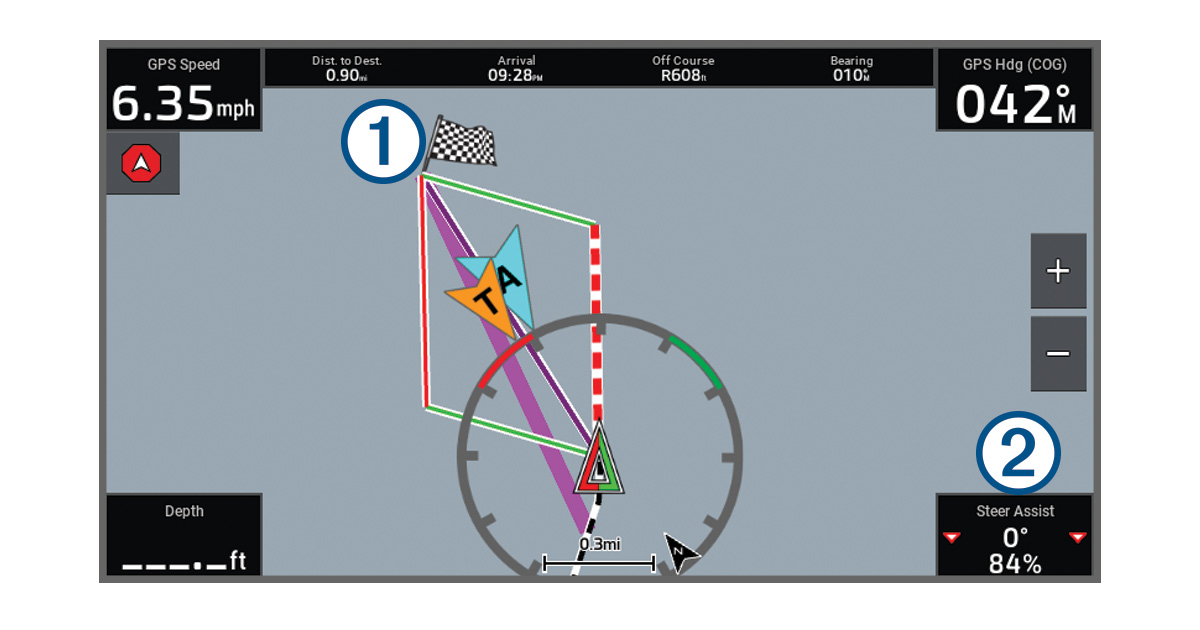
Navigation turn or destination:
The wide magenta line indicates the initial route line to the next turn or the
destination.
The thin purple line from your vessel to the next turn or to the destination
indicates your present bearing to the next turn or to the destination.
The port and starboard laylines are determined by the polar table you are
using.
The bold dashed line (can be red, green, or purple) indicates the recommended
Steer Assist
bearing to follow.
Steer Assist data
field:
The first number listed indicates how you should turn to align with the
suggested optimal course for the present maneuver. A value of 0° indicates that
you are on course.
The percentage indicates your present speed as compared to the ideal speed for
the conditions. If the number is lower than 100%, you should consider adjusting
the trim to increase your speed.
The triangle or triangles on the side also provide guidance based on the color
and shading:
A red triangle or triangles indicate that you are aligned with the port
layline.
A green triangle or triangles indicate that you are aligned with the
starboard layline.
A magenta triangle or triangles indicate that you are aligned with the
bearing to the next turn or destination.
A triangle with a white center indicates that you are within 3° of the
optimal course and should maintain your heading.
A solid triangle or triangles indicate that you are off course by more than
3° and should adjust your heading.
 > Preferences > Navigation > Steer Assist.