Navigating with the Dive Compass

  1. During a dive, scroll to the dive compass.
    NOTE: The appearance of the dive compass may vary if you view it in a data field.
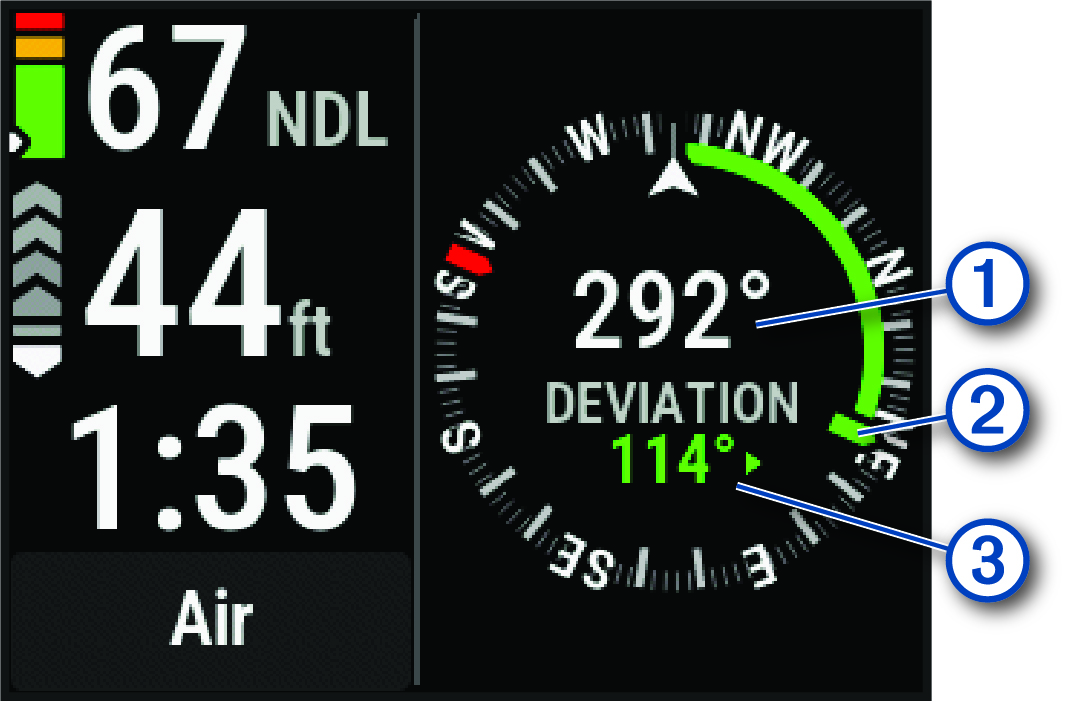
    Dive compass with callouts

    The compass indicates your directional heading 1.

  2. Press ENTER.
  3. Select Compass.
  4. Select an option:
    • To set the heading, select Set Heading.

      The compass indicates deviations 3 from the set heading 2.

    • To set the heading again, select Change Heading.

    • To change the heading by 180 degrees, select Set to Recip..

      NOTE: The compass indicates the reciprocal heading with a red mark.
    • To set to a 90-degree heading left or right, select Set to 90L or Set to 90R.

    • To delete the heading, select Clear Heading.

GUID-EBD9D9CA-112E-4044-A2C9-354D565B9A10 v1
September 2025