Tracking Your Location on the Map

You can track your location on the map and start a tracking activity.

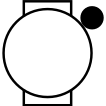
  1. From the watch face, press Upper-right button.
  2. Select Map.
  3. Press Upper-right button.
  4. Select Start Tracking.
    The activity timer starts, and your location and track line appear on the map.
  5. Press Upper-right button, and select Stop Tracking to stop the activity timer (Stopping an Activity).
GUID-EA112C95-8563-4EED-AADF-2AADFBB95646 v3
April 2026