Tacx Training App
-
Ride exciting courses without leaving your home.
-
Create your own rides, workouts, and more.
-
Manage your training, customize the default settings, and diagnose issues.
-
Sync your indoor training data with your Garmin Connect™ account.
-
Update your device software (Updating the Tacx Alpine Software).
Status LEDs and Buttons
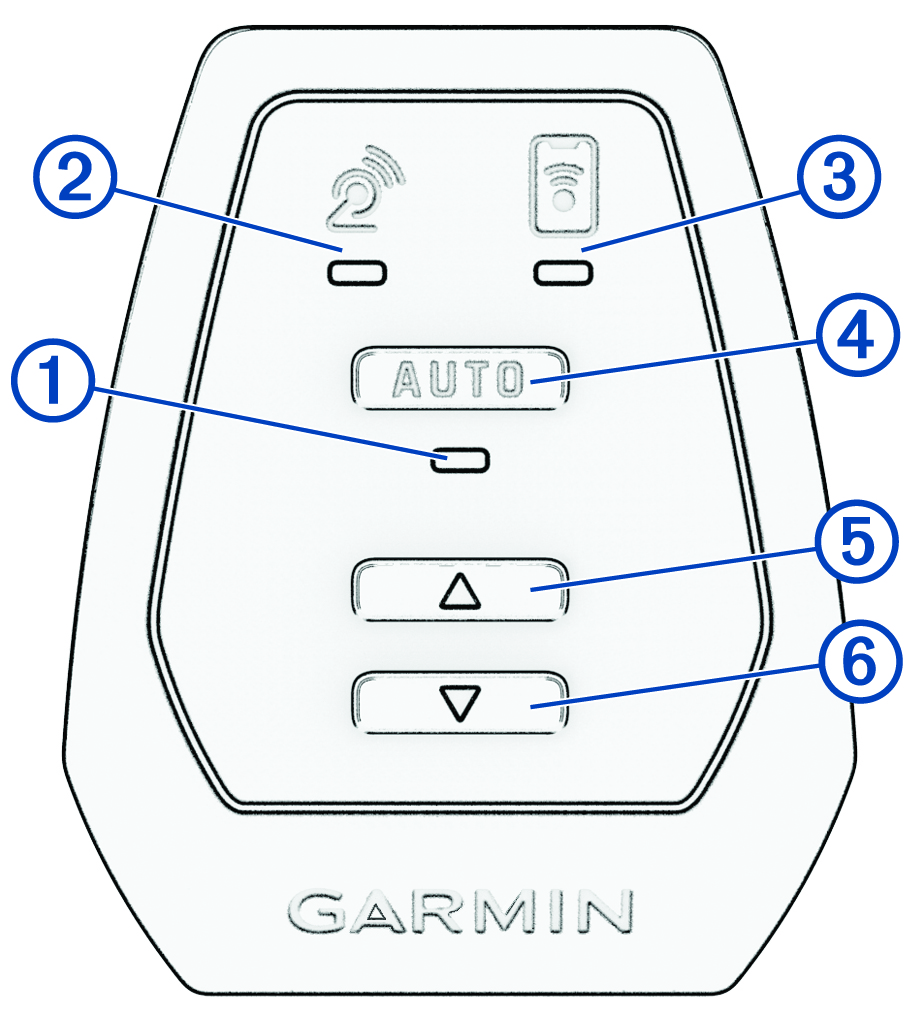
|
Training mode LED |
Automatic training mode (LED is on) means that the Tacx Alpine automatically follows the grade of the course. Manual training mode (LED is off) means that you must use Slowly flashing LED means that the Tacx Alpine requires calibration (When should I calibrate the Tacx Alpine?). |
|---|---|
|
Trainer connection LED |
Solid LED means that the Tacx Alpine is connected to the trainer. Flashing LED means that the Tacx Alpine is searching for the trainer. |
|
Mobile device connection LED |
Solid LED means that the Tacx Alpine is connected to the app. Flashing LED means that the Tacx Alpine is searching for the app. |
|
AUTO |
Press to switch between automatic and manual training modes. Hold for 3 seconds to put the device into pairing mode. Hold for 10 to 15 seconds to perform a factory reset (The Tacx Alpine is not responding). |
|
|
Press to manually increase the slope. |
|
|
Press to manually decrease the slope. TIP:
To return the
Tacx Alpine to 0% grade, you can press
  at the same time. at the same time.
|
|
Troubleshooting |
For more information, see Troubleshooting. |