Wiring Diagram
See the Important Safety and Product Information guide in the product box for product warnings and other important information.
Garmin® strongly recommends having an experienced installer with the proper knowledge of electrical systems install the device. Incorrectly wiring the power cable can result in damage to the vehicle, the battery, or the device and can cause bodily injury.
The device must be mounted in a suitable and secure location, based on available power sources and safe cable routing.
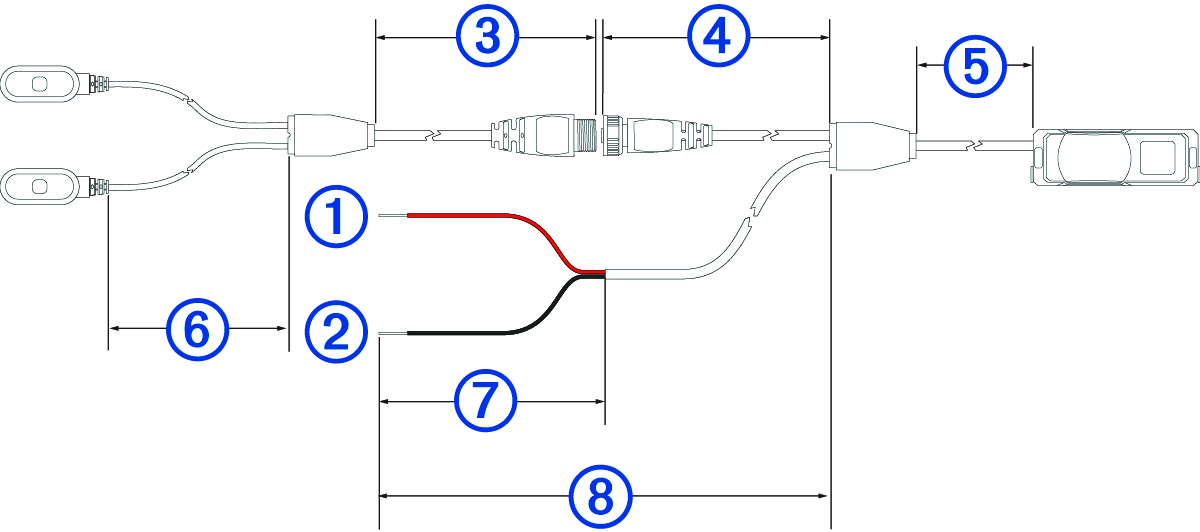
|
|
10 to 30 Vdc system power (red) Cable length: 0.15 m (5.9 in.) |
|---|---|
|
|
System ground (black) Cable length: 0.15 m (5.9 in.) |
|
|
Cable length: 1.4 m (55.1 in.) |
|
|
Cable length: 3 m (9.8 ft.) |
|
|
Cable length: 1 m (39.3 in.) |
|
|
Cable length: 0.95 m (37.4 in.) |
|
|
Cable length: 0.15 m (5.9 in.) |
|
|
Cable length: 7 m (22.9 ft.) |
All measurements may vary by 3 cm (1.2 in.).
In-line Fuse Cable
Garmin strongly recommends having an experienced installer with the proper knowledge of electrical systems install the in-line fuse cable. Incorrectly wiring the power cable or the in-line fuse cable can result in damage to the vehicle or the battery and can cause bodily injury.
In many cases, you must install the included in-line fuse cable on the device power cable to protect the device from excessive electrical current.

-
You must install the included in-line fuse cable if you are connecting the power cable directly to the vehicle battery.
-
If you are connecting the power cable to an accessory power source or bus bar that already has a suitable fuse or a protective circuit, installing the included in-line fuse is not necessary.
-
When installing the in-line fuse cable, you should connect it to the red system power wire using the included splice connector.
-
Before installing the in-line fuse cable, you should remove the fuse from its socket, and reinstall it when you are finished.
Changing the Fuse in the Fuse Cable
When replacing the fuse, verify the replacement fuse is fully inserted into the fuse housing. The vehicle power cable does not work unless it is assembled correctly.
- Lift up the cover from the top of the fuse housing.
- Insert a new 3 A fuse.
- Replace the cover on the fuse housing.