Bypassing the System from the GOS 10 Hub

If bypassing the Garmin OnBoard™ engine cutoff system using a connected chartplotter does not work as expected, or if you prefer to use a different method, you can bypass the system directly from the GOS™ 10 hub.

  1. Disconnect the wiring harness from the GOS 10 hub.
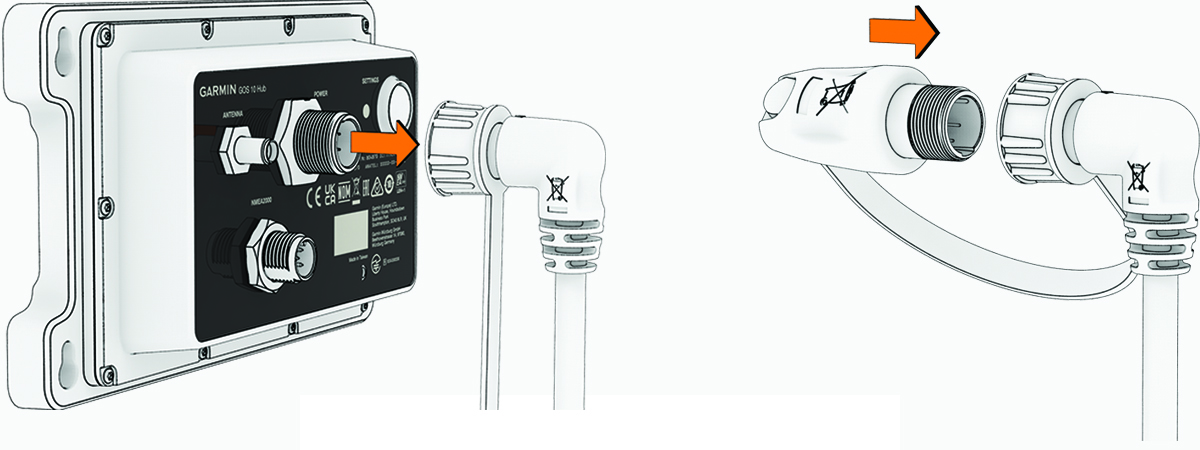
    Bypassing the system
  2. Connect the bypass module to the wiring harness connector, and tighten the locking ring.

    The bypass module should be tethered to the connector end of the wiring harness.

    The Garmin OnBoard engine cutoff system is now disabled, and the engines should be restored to previous functionality.

    NOTICE
    The system remains disabled until you enable it again. You must enable the system as soon as possible to be compliant with the AYBC A-33 standard.

To restore the Garmin OnBoard engine cutoff system again, disconnect the bypass module and reconnect the wiring harness to the GOS 10 hub.

GUID-8D60E520-A4CC-4669-8D45-79C61C3778A4 v2
January 2026