Inserting Memory Cards (GPSMAP 9x10xsv/9x13xsv/9x17xsv/9x19/9x22/9x24/9x27)

Use of an 8 GB or larger memory card with speed class 10 is recommended. As of software version 34.00, the internal card readers on GPSMAP® 9000 series chartplotters support up to a 1 TB microSD® memory card, formatted to exFAT with speed class 10 or higher.

NOTE: When you insert a new memory card into the chartplotter, the chartplotter starts writing private information onto the newly-added card.
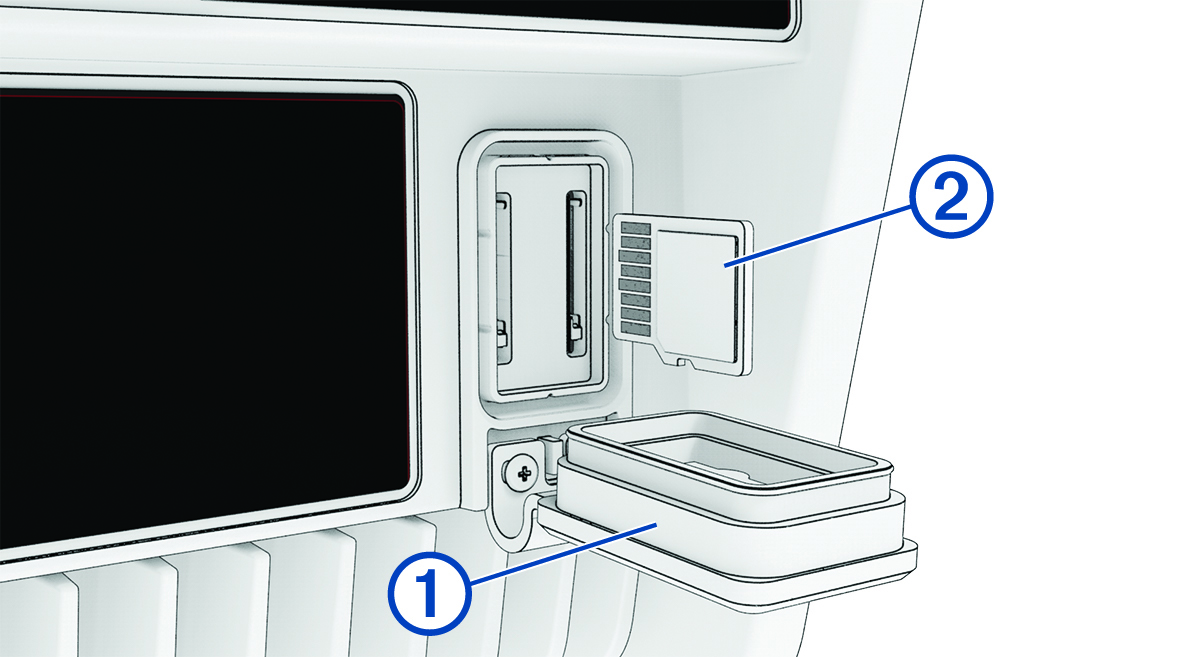
  1. Open the weather cap 1 on the back of the chartplotter.

    Memory card insertion with callouts
  2. Insert the memory card 2.

    There is no difference between the two card slots on the chartplotter. Any compatible card can be inserted into any open card slot, and it will be read by the chartplotter.

  3. Press the card in until it clicks.
  4. Clean and dry the weather cap.
    NOTICE

    To prevent corrosion, be sure the memory card and weather cap are thoroughly dry before closing the cap.

  5. Press the weather cap firmly shut.
GUID-8D60E520-A4CC-4669-8D45-79C61C3778A4 v1
October 2025