Starting Line Guidance
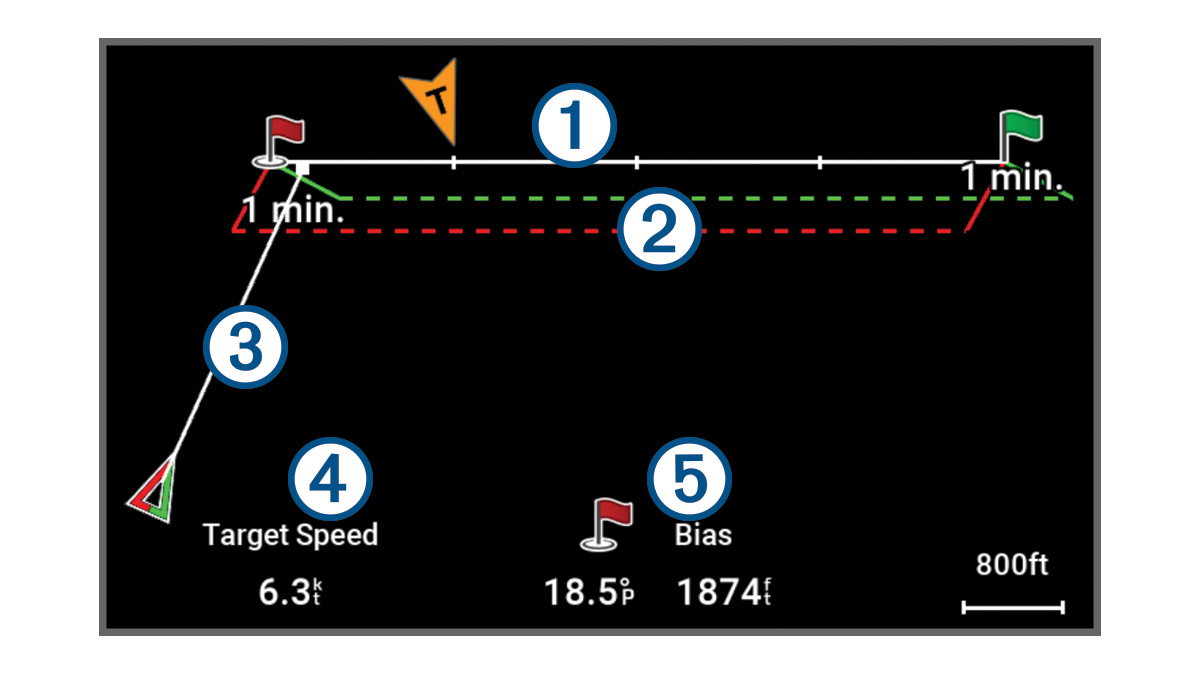
Sailing start line guidance is a visual representation of the information you need to cross the start line at the optimal time and speed.
By default, the start line guidance window and the race timer window appear in the Sail Racing combination screen.
Before you can view the starting line guidance information, you must define the port and starboard points of the start line (Setting the Starting Line).
 |
Port and starboard points of the start line. |
|---|---|
 |
Start line bias point. See below. |
|
Start line indicator. This line is defined by the port and starboard points you specify. |
|
|
Port and starboard laylines. The solid lines show the laylines in relation to each start point. |
|
|
Predictor line. This appears after you define the port and starboard pins, the target speed and time, and you start the race timer. The end point and color of the predictor line indicate where the boat will be when the timer expires, based on your current boat speed.
|
|
|
Desired speed when crossing the start line or Target Speed from the polar table. |
|
|
Start line bias information. This indicates which end of the start line, port or starboard, you should try to target when approaching so you can cross the starting line at the fastest speed based on present wind and other conditions. |
Using the Starting Line Guidance
You can use the starting line guidance feature to help get you cross the start line, at the optimal speed during a sailing race.