Your route on the map
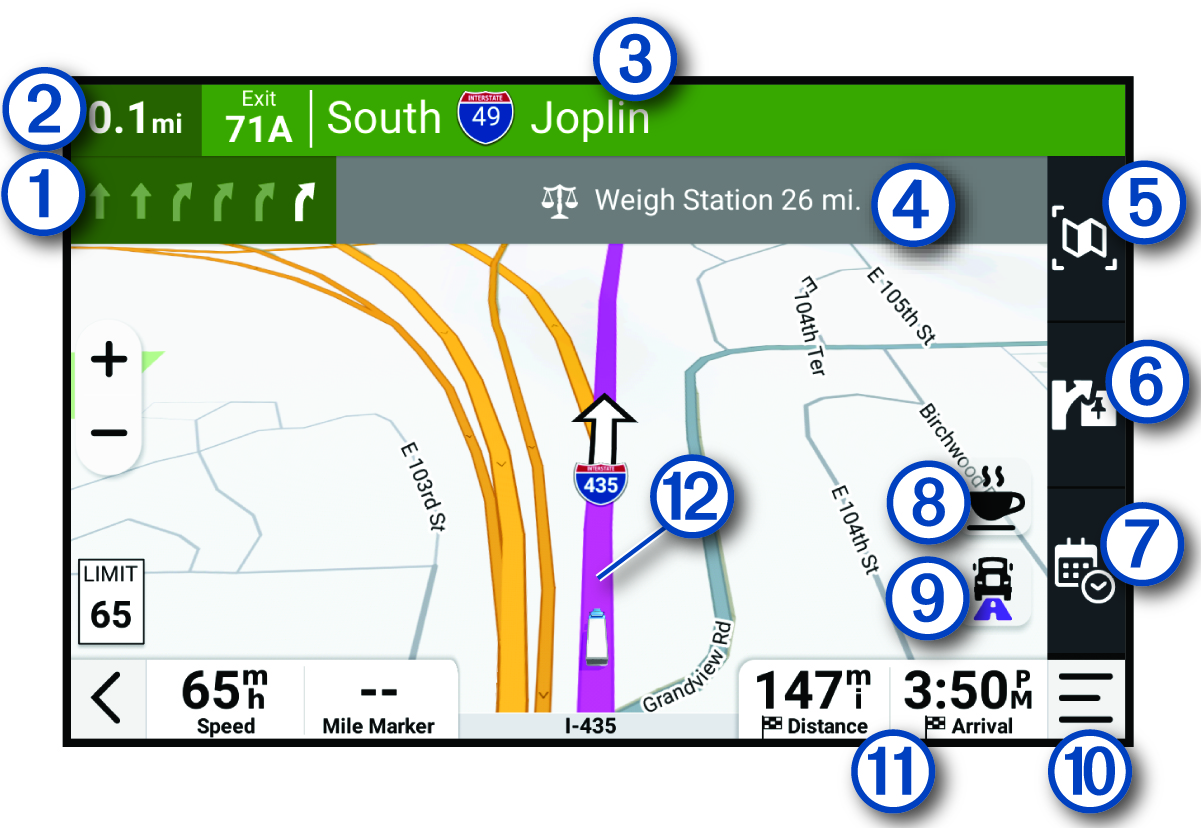
As you travel, the device guides you to your destination using voice prompts and information on the map. Instructions for your next turn or exit, or other actions appear across the top of the map.
|
|
Next action in the route. Indicates the next turn, exit, or other action and the lane in which you should travel, if available. |
|---|---|
|
|
Distance to the next action. |
|
|
Name of the street or exit associated with the next action. |
|
|
Notifications about your route. |
|
|
Select to view an overview of the route. |
|
|
Select to view upcoming points of interest along your route. |
|
|
Select to view satellite imagery of your destination and plan your arrival. The dēzl™ app is required to download satellite imagery. |
|
|
Select to search for points of interest along your route. |
|
|
Select to toggle popular lorry routes on the map. |
|
|
Map tools. You can select tools to show you more information about your route and surroundings. |
|
|
Data fields. TIP:
You can touch these fields to change the information they show (Changing the map data field).
|
|
|
Route highlighted on the map. |